Search This Blog

Wednesday, August 31, 2011

How to create a Google+ badge for your website (or blogger)

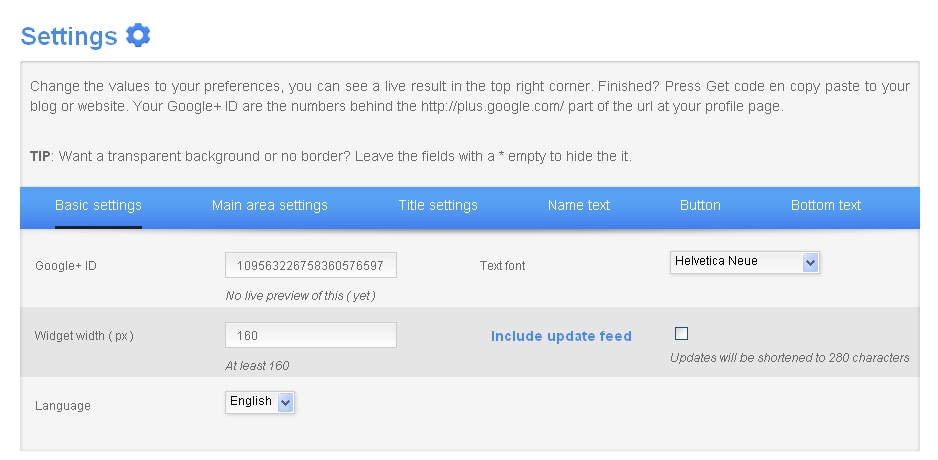
I used this very nifty little tool at widgetsplus to create a Google+ badge.

  • Get your Google+ ID. (the easiest way is to login to Google+ Your ID number is the long string of numbers For example my public profile is http://plus.google.com/109563226758360576597; the ID number is that bit at the end. For more info about Google IDs, visit my post here
  • Copy your ID number.
  • Customize your widget using the widget tool. If your name is very long, you will want to use a width greater than 160 or a smaller font size (it will truncate your name otherwise). My name is georgiawebgurl;I used a smaller font size since I wanted this in my sidebar.
    • Basic settings: your Google+ ID, width of badge, and whether you want to include any of your latest posts. 
    • Main area settings: Widget colors. 
    • Title settings: Change the tag line (the default is Add Me On...)
    • Name text: change colors, font type, and size of text relating to your name
    • Button: Font size and colors for button (* makes transparent) 
    • Bottom text: Font size and color for text at bottom (including the latest posts, if you select 'Include update feed') 
    • Click on Get Code to see preview and get the code for copy + paste.  
    • Copy code.
Here is what the code looks like in case (yes, you can copy and paste the code, but then you still need to customize it for you!)


    Add your Google+ badge to blogger 

    • Go to Design.
    • Decide where you want to add it on your blog template (mine is left sidebar) and click on Add a Gadget.
    • Under Basic Gadgets find HTML/Javascript
    • Click on the + button to add it to your design.
    • Title (you can leave this blank if you do not want it have any text above your widget)
    • Paste in your code from widgetsplus.
    • Save your template. Voila!


    Monday, August 29, 2011

    Big changes to Facebook privacy (an overview)

    So Facebook is rolling out new changes to your news feed (you may have it already). On the plus side for privacy: You can control who sees stuff that is posted about you (like tagged photos) which finally closes one huge privacy leak (changes will not affect older photos but you can retrospectively change them - tomorrow's blog topic!). You can also limit old posts - an interesting idea for possible use for pages (part of tonight's post which publishes in the morning)
     
    Facebook now makes it  extraordinarily easy to add location info (data) into your post (use this carefully - I can see where it would be very useful to include that info with events, but please please please remember public = everyone on the www. Think before you tell people where you are or will be ...) So, as always, it is up to you to decide how much info you want to share.

    The first time you see your new settings you'll be guided through the process (you can read about the changes here); after that your settings will apply to all new posts. Settings can be changed via the little buttons at the bottom (and you can still set some default (override) settings via your privacy page.
    • What's on your mind [default]: same as before for the most part
    • Say who you are with - when you @ someone it tags them 
      • If you don't understand how this works, when you tag someone it shows up in their feed and their friends can then see your post too (depending upon their privacy settings).  You now have final control over that privacy setting.
      • You still control who sees your status update. If you already have a custom status update, that should stick (but it's worth checking). The big news here is that you can control whether friends of your friend who tagged you can see the info (or photo).


    I can see some good uses of tagging location as it will make for an an easy way to add location for direction purposes for events, but I won't be using it like foursquare (will you?)


    ...and don't forget to take a look at your new privacy page which has been  "simplified" - it looks better, but I think there still needs to be an Advanced or ALL that shows exactly all settings for everything on all page (vs. splitting them up into sections).

    Always doublecheck your settings any time Facebook rolls out changes. You don't want to get caught unaware. Now would be a good time to go through your applications, removing any old games or apps you no longer use. Also, if you are not seeing everyone in your stream, do not forget to change that via  Recent> Edit Options> Choose All
     
    In a nutshell, the biggest changes I see are
    • Giving control over content posted by others to you.  From Facebook: "We removed a setting that limited whether the friends of people you tagged could see a post. Now you control this by choosing who you tag and approving tags other people add to your content. Your old posts won't change - unless you limit older posts.
    • Finally changes the terminology "everyone" to "public" since that is what it is. From Facebook: "Also, we've changed the label for "Everyone" to "Public," but your posts will still reach the same people."
    • Made it easier to add location / geo  info.

    Thursday, August 25, 2011

    How to create a customized URL in Google+

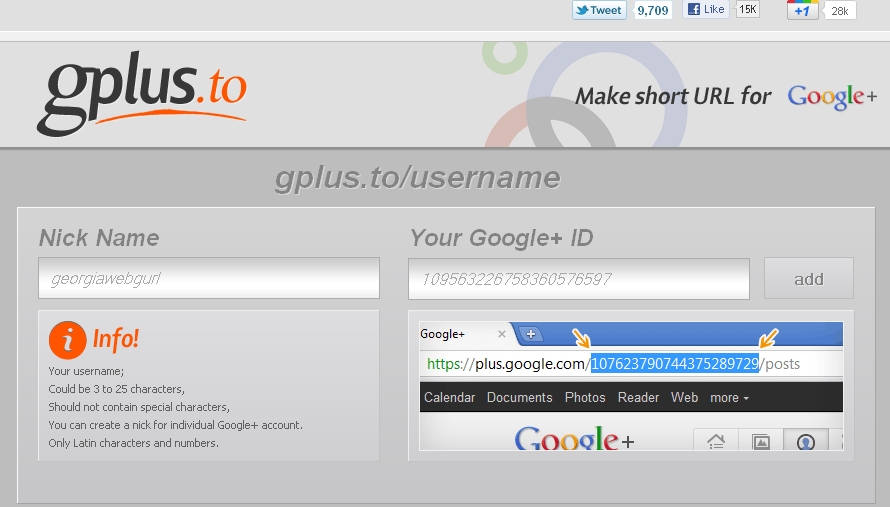
    This is actually easy to do and you could use any URL shortener such as bit.ly, is.gd, etc. but there is now a URL tool to make a nifty "custom" url for your Google+ profile, Gplus.to. Gplus.to uses your username or Google id number. Didn't know you had an id number at Google? Well you do. ;-)

    Creating a custom URL for Google+ using Gplus.to
    •  Login to Google+ to find your ID number. 
    • Your ID number is the long string of numbers For example my public profile is http://plus.google.com/109563226758360576597; the ID number is that bit at the end.
    • Copy your ID number.
    • Go to http://gplus.to/
    • Choose a nickname (this will be the base of custom URL)
    • Enter your Google+ ID
    • Click add
    • Voila - gplus.to/georgiawebgurl


    Creating a custom URL for Google+ using a different service
    If you are using a different url shortener such as bit.ly, is.gd, tinyurl, etc. you will need to get your actual Google+ ID for you.
    • The public profile link for you is http://plus.google.com/[yournumber]/about but you can create shortcuts to any part of your Google+. 
    • Go to the URL shortening service you want to use. Copy and paste your URL in. 
    • Voila, you have a new URL - http://bit.ly/georgiawebgurlprofile   

    Wednesday, August 24, 2011

    Social media in Higher Education Panel discussion (Podcast)


    LinkedIn: Web 2.0 Social Media Panel (2008)
    UGA faculty Kaye Sweetser, Janet Frick, withDavid Noah from the Center for Teaching and Learning discuss Web 2.0 Social Media at the Student Learning Center. Facilitated by robin fay
    <

    Tuesday, August 23, 2011

    Seeking conference proposals (library conference)

    Have you been looking for an opportunity to present at a national conference? If so, the 2nd Joint Conference of Librarians of Color, a conference for EVERYONE, is seeking proposals. It's not too late for you to submit a proposal, but time is running out! The deadline for submissions is September 15, 2011.


    This historic conference, which will be held in Kansas City, Missouri in September 2012, will be an excellent opportunity for you to share your knowledge and expertise in one of the following areas:


    Advocacy, Outreach and Collaboration
    Marketing; outreach to diverse populations; community collaborations; user spaces; public policy; health education; using census data and other government information; cultural programming; services to and rebuilding of communities hit with disaster; research; undocumented, urban, rural and low-income communities; etc.


    Collections, Programs and Services

    Ethnic and multicultural collections; film and music; information literacy; children’s, youth and adult programming; programs for diverse populations; reference; instruction; grant funded programs; technical services; archives; preservation; documenting traditional knowledge; research; cataloging/subject headings/controlled vocabulary; etc.


    Deep Diversity and Cultural Exchange (understanding and valuing differences)
    Increasing awareness and tolerance of “minorities”; disabilities; gender; celebrating elders; religion; sexual orientation/LGBT populations; nationality; sharing traditional knowledge; serving the incarcerated; immigrant and refugees; cross cultural issues; transnational communities; multiculturalism; best practices and model programs; etc.


    Leadership, Management and Organizational Development
    Administration; staff development/training; recruitment and retention; leadership; organizational culture; management; cultural competencies; mentoring; assessment; mid-career strategies; staff and paraprofessional issues; conflict resolution and mediation; re-organization and re-structuring; leading during tight economic times; institutional change; research; fundraising; etc.


    Technology and Innovation
    Teaching and learning; emerging technologies; e-repositories; social networking applications; digitization; equal access for users; library tools; e-books; mobile devices; widgets; mashups; online learning and collaboration; open access movements; social aspects of technology and implications for use; videos; etc.


    All sessions will be 75 minutes long and may take one of the following formats:

    · Panel
    · Individual Paper/Presentation
    · Roundtable

    · Workshop
    · Poster Session


    **JCLC will also accept proposals in different formats (other than those listed above) that will excite, engage and create a new learning environment for conference attendees**


    All proposals must be submitted to the Joint Conference of Librarians of Color website at: http://www.jclc-conference.org by midnight PST on September 15, 2011. No late submissions will be accepted.


    All proposals will be blind reviewed (without author identification) by the JCLC Program Committee. Proposals are evaluated on quality and clarity of content, uniqueness of topic, relevance to conference attendees, ability to engage the audience, and the relationship of the proposal to the mission of the conference.


    Jennifer Baxmeyer and Gladys Smiley Bell
    Friday, August 19, 2011

    Athica Mystery Triennial Fundraiser & Exhibit

    If you're looking for something to do this weekend (or even next month), please consider visiting the Athica Mystery Triennial Fundraiser & Exhibit.  120 artists are exhibiting artwork including quite a few members of the UGA community (me, among others - & no this piece is not part of the auction).

    ATHICA Mystery Triennial
    Small works by more than 120 signature Athens’ artists all displayed anonymously
    August 20 – September 18, 2011
    Opening Reception:
    Saturday, August 20: 7:00 - 9:30 p.m.
    7:00 – 8:00 p.m.: ‘First Dibs’ with $10 donation
    8:00 – 9:30 p.m.: Free Entry
    Refreshments donated by Five and Ten, Ted’s Best Food and other fine establishments.
    athica.org

    Artist list: Rinne Allen | June Ball | Nina Barnes | Elizabeth Barton | Wayne Bellamy | Greg Benson | Jorie Berman | Stanley Bermudez | Gregg Bernstein | Rebecca Brantley | Tony Bravo | Vanessa Briscoe Hay | Jim Buonaccorsi | Amanda Burk | Don Byram | Lucy Calhoun | Jamie Calkin | Ainhoa Canup | Toni Carlucci | Jill Carnes | Laura Carter | Nancy Carter | Andrew Cayce | Bob Clements | Claire Clements | Cal Clements | Toby Cole | Dana Jo Cooley | Bob Davis | Chris Davisdson | Kim Deakins | Krista Dean | Brooke DeVere | Didi Dunphy | Margot Ecke | John English | Will Eskridge | Robin Fay | Larry Forte | Laura Foster | Cooper Gage | Lauren Gallaspy | Annette Gates | Jennifer Graff | Jillian Guarco | Alexei Gural | Krysia Haag | Amy Hairston | David Hale | Melissa Harshman | Jonathan Hart | Bob Hart | Jennifer Hartley | Annette Hatton | Joe Havasy | Hope Hilton | Brian Hitselberger | Christopher Hocking | Katherine Hodges | Nash Hogan | Jeremy Hughes | Joel Izlar | Stefanie Jackson | Jonathan Jacquet | Carol John | Cindy Jerrell | Hannah Jones | Jasey Jones | Robert Sparrow Jones | Kenneth Kase | Violet Kester | Megan Kluttz | Missy Kulik | Michael Lachowski | Charlotte Lee | Diana Lee | Nancy Lloyd | Peter Loose | Bart Lynch | Barbara Mann | Jenn Manzella | Michael Marshall | Carl Martin | Valerie Mathews | Erin Mcintosh | Manda Mckay | Katherine McQueen | Judy McWillie | Rosemary Mendicino | LeeAnn Mitchell | Caroline Montague | Andy Nasisse | Carlo Nasisse | Jim Norton | Michael Oliveri | Rich Panico | Mary Pearse | Lanora Pierce | Mary Porter | Karla Pruitt | Lea Purvis | Darcy Reenis | Kathryn Refi | Bryan Poole | REM | Ben Reynolds | Cecilia Reynolds | Art Rosenbaum | Margo Rosenbaum | Malissa Ryder | Beth Sale | Havivah Saltz | Noah Saunders | Hal Schwarze | Charley Seagraves | Rene Shoemaker | Eric Simmons | Mark Steinmetz | John Stidham | Lawrence Stueck | Jon Swindler | Tara Taylor | Larry Tenner | Paul Thomas | Jason Thrasher | Steve Trimmer | Andrea Trombetta | Tatiana Veneruso | Rusty Wallace | Robyn Waserman | Mark Watkins | Drew Weing | Jacob Wenzka | Charles Westfall | Eddie Whelan | Ouida Williams | Anthony Wislar | Cheri Wranosky |

    robin fay
    univ. of georgia libraries

    Thursday, August 18, 2011

    It's not you (or is it?) - on why you can't get a job

    Karen Schneider of Free Range Librarian, has an excellent post, Why you didn't get an interview. I started writing a comment and realized I was probably 2000 characters over the limit. ;-) I did leave a brief comment but I'm blogging my thoughts.

    Karen points to 5 main factors: TMJS (the job market sucks - definitely true), the Known Quantity (libraries hire what they know vs. an unknown I can learn/do/be the job - in other words newbies with little experience or professional reputation), CV/resume problems, you're not the Main Event (libraries have other things to do and tons of applicants to wade through - especially in TMJS environment) , you're not selling yourself and finally, the job hunt (and hiring) process is somewhat of a gamble.

    All of those are definite factors. Recently I attended a twitterchat on the job hunt process; most of the people in the chat were marketing or IT, but several common threads came out which reflect Karen's thoughts. (..and yes, that is the kind of thing I do for fun when I'm not shooting photos, making art, or doing yoga... LOL - you can follow me on twitter if you like) We had a lot of discussion about resumes/CVs/coverletters. ALOT. I reviewed resumes and cover letters for ALA's NMRT for 5 years or so and I consistently gave the same feedback.Things haven't changed that much except everything is just magnified.
    • Network professionally - seriously you have to do it - because if you are not, another applicant is. Use social media effectively. 
    • Cleanup your digital footprint. What is Google saying about you? If you haven't already done this and you have some not-so-professional stuff out there, you need to work on that. Nothing is almost as bad as something less professional (almost) Why? Because nothing says 1)you do not believe in technology or 2) you do not use technology. Seriously, who wants that person working in your library? There are alot of tools out there to create your digital identity if you haven't already (linkedin, about.me are good resources). Because someone on the search committee will Google you. Possibly everyone.
    • Get some library experience - In this TJMS, that is a very big strike against an applicant.  Volunteer, internships, practicums, committee work, etc. count as work experience. True they will not have as much potential weight as the work of an internal candidate doing a similar job but that is going to be a hard person to compete with anyhow. SO do include them in your cover letter (state why they important to the particular job for which you are applying) and then add them in your resume. For those of you with experience, continue to accumulate it  any way you can. Serve on a committee professionally. Volunteer - even community groups and nonprofits have libraries or collections. For that matter, you may not even need to work with a library. If you need instruction experience, volunteer to teach a class on a particular topic. It's not enough to develop the skills the job needs. Plus, all of those people you come in contact with = potential references!
    • Resumes and cover letters
      • Use the job posting to craft your resume and cover letter. Hit every qualification that you can.
      • Length of experience generally will impact length of the resume/CV. If you are  new to the profession, chances are you will not have an overly long resume - unless you have been very active professionally. Regardless, please don't pad your resume to make it longer. If you include a CV that is very lengthy, please do a summary of qualifications.  
      • Develop flavors. Tailor your resumes and cover letters to match the job. Have different flavors that you can quickly adapt. I have a webdesign flavor that is completely different from my library flavored resume. Same with my art work. 
      • Make it relevant. If you're applying for a tech services job and you point out all of your teaching experience in your cover letter, explain why it is relevant. (and it can be... prioritizing, detail, developing lesson plans can translate to training and writing procedures; students> grading (evaluating work). 
      • Spell names correctly. Spell the job correctly. Use the spellcheck tool (seriously, who doesn't use that?)
      • Proofread, proofread, proofread.
      • No personal info. Do not include information about political or religious affiliation OR any other personal information. It is okay to include that you organized or cataloged a church's library (if you feel comfortable including that info) or that you organize programs for the local homeless shelter. Those go under volunteer WORK experience.
      • Axe the irrelevant. On final readthrough, is there anything potentially irrelevant to the job for which you are applying? Axe it.   
      • Resume review - use it. Use NMRT Resume Review if you can. Hit up your teaching and writing friends to review it.

    Monday, August 15, 2011

    I Love my librarian award

    Nominate your favorite librarian!
    Contact: mhumphrey@ala.org

    Nominations are open for the 2011 Carnegie Corporation of New York/New York Times I Love My Librarian Award.

    The award invites library users nationwide to recognize the accomplishments of librarians in public, school, college, community
    college and university libraries for their efforts to improve the lives of people in their community. Nominations are being accepted
    online at atyourlibrary.org/ilovemylibrarian through Sept. 12.

    Up to 10 librarians will be selected. Each will receive a $5,000 cash award, a plaque and will be honored at an awards ceremony and
    reception in New York, hosted by The New York Times, in December.

    Over the past three years, 30 librarians from across the country have won the I Love My Librarian Award. Last year, more than 2,000 library users nationwide nominated a librarian, and Jeff Dowdy of Bainbridge College Library was named one of the winners. For more information on previous winners, visit atyourlibrary.org/ilovemylibrarian.

    Each nominee must be a librarian with a master’s degree from a program accredited by the ALA in library and information studies or a master’s degree with a specialty in school library media from an educational unit accredited by the National Council for the Accreditation of Teacher Education. Nominees must be currently working in the United States in a public library, a library at an accredited two- or four-year college or university or at an accredited K-12 school.

    The Carnegie Corporation of New York/New York Times I Love My Librarian Award is administered by the Campaign for America’s Libraries, ALA’s public awareness campaign that promotes the value of libraries and librarians. The Campaign is made possible by ALA’s Library Champions, corporations and foundations.

    Sunday, August 14, 2011

    Call for proposals: Connecting, Assessing & Innovatinges

    Call for Proposals Due September 7: ELI 2012 Annual Meeting
    Submit a preconference seminar or session proposal by September 7 for the ELI 2012 Annual Meeting in Austin, Texas, and online, February 13–15. This year's theme is "Taking the Pulse: Connecting, Assessing, and Innovating." We will explore a rich matrix of themes that capture key opportunities and challenges facing the teaching and learning community. Some of the questions confronting us include:
    • What are the new challenges and opportunities associated with digital literacy? 
    • What are the methods and ways we have to assess the effectiveness of our innovations, practices, and programs? 
    • What are best practices in the emerging field of learning analytics? 
    • Are social media and social networking living up to their potential to accelerate our progress toward active learning engagements?
    Open Educational Content
    The full online and face-to-face program will be available mid-fall. Register today; this event will fill up quickly.

    Friday, August 12, 2011

    Question of the day: Declutter your inbox and how to conquer email overflow

    So, a question came up about how to handle huge volumes of email. There are alot of different approaches out there, but here are a few ideas that work for me:
    • Think before you send:
      • Don't cc EVERYBODY. Some people may not need individual workflow emails, just an occasional project update is all that is needed for some people. 
      • Don't use return receipt WITH read request acknowledgments. If someone reads your email obviously, they got it. ;-)   (and you will just add to your emails!) Also, think about why you are using return receipt and read request -- is it really necessary?
      • Use web based discussion groups instead mailing lists, when possible. Do you have to be on a mailing list? Do you have to keep one? Would a Google group or project group work better (and reduce your email, too)?
      • Subject lines - use them. Make them straight to the point. 
      • Save a copy of your emails in a sent folder vs. cc'ing yourself. Don't add to your inbox.
      • Reply to the original sender not the group. More than likely your email applies to a particular person vs. the group at large. Think before you send.
    • Manage your inbox better.
      • Don't subscribe in multiple formats. If you get news through your reader, don't subscribe to email or phone alerts.  
      • Unsubscribe to anything which is no longer relevant to you. You can always subscribe later.
      • Filter. Set up filters to organize info.
      • File. File. File. Seriously. Strive for a zero inbox.  If you can't bear to delete it, put in a folder or label for later. Get it out of your inbox. If it's a deadline, put it on your calendar. If it's a todo list, put it on your calendar. If it's a procedure, put it in a document (and then put it on your intranet or the web - wherever you put such things).
      • Decline. If you do not need to be part of a particular email discussion, it is okay to ask why you were included. If you just need a project update, it is okay to tell the group that. 
      • Generally, you do not need to read each and every email. Search and delete or scan and delete.
      • ...Delete.Delete. Delete. Delete.
    • Use your tools. 
      •  If you use email for work, keep your work and personal (and perhaps, networking/social media) emails separate. Stick to it. If someone emails you at the wrong address, forward it to the "correct" email address, and answer them from there (also explain that they need to use this address)
      • Use threaded email if at all possible.
      • Use social media appropriately. You may be able to cut down on some email by using social media message, blogging, or tweeting.
      • Sometimes a phone call or IM is the quickest way to resolve something.
      • Use RSS feeds instead of subscribing to news or blogs delivered to your email - that way you can use your reader to quickly scan headlines or just search for relevant topics.  
      • Use virtual calendars, project management tools, collaboration tools, etc. to keep your inbox clean.
      • Emails are not meant to be the archive for procedures, policy decisions, etc. Document appropriately.

    Thursday, August 4, 2011

    Research and the library's role (a response)

    I recently read," Research Librarianship in Crisis: Mediate When, Where, and How?" by Bohyun Kim at the ACRL blog (http://acrlog.org/2011/08/01/research-librarianship-in-crisis-mediate-when-where-and-how/)

    "I think that librarians will still be needed for research in the digital era.... Users will no longer need nor desire human mediation in basic and simple tasks such as locating and accessing information. Most of them already have no patience to sit through a bibliographic instruction class and/or to read through a subject guide.

    But users may appreciate and even seek for mediation in more complicated tasks such as creating a relevant and manageable data set for their research. Users may welcome any tool that libraries offer that makes the process of research from the beginning to the final product easier and faster. They will want better user interfaces for library systems. They will appreciate better bridges that will connect them with non-library systems to make library resources more easily discoverable and retrievable. They will want libraries to be an invisible interface that removes any barrier between them and information. "

    I've been pondering those passages for a while as they get to the heart of not only my experience as a user of a few different libraries (and as a future PhD candidate I expect my use of libraries will skyrocket) but also in terms of the disconnect that I see between the services offered by many libraries, user expectations, and even media coverage offering evidence and opinions that libraries are obsolete.

    Many libraries are still doing business as usual; measuring statistics in the same way focusing on library as place(even the library's website is a destination ), library as storage, library as a collector of history, library as a house of knowledge brokers, library as a free book (and movie and music) rental service. I'm not saying we should get rid of those - they are parts of the CORE services to a library.

    However, none of those really matter if you can't find what you need. It's the tools that we have to offer that make us valuable because they make our resources (and others) accessible. Unfortunately, our tools SUCK ... and it's no wonder - proprietary silo-ed data that doesn't play well with others. Websites, portals, and interfaces DESIGNED by librarians and programmers (who I love dearly, but are usually not DESIGNERS). Terminology that only we understand. Throw in the added complication of different target audiences with different expectations and needs, politics, funding and staff issues (how much training is happening for staff in libraries to keep them current with the technology the library supports?)

    I don't have an easy answer; we're still in the people business, which is becoming dependent upon the information business. As the U.S. becomes more mobile (perhaps, we will eventually catch up to other countries), the demands for information are going to grow: information in all forms and formats. It's carrier and platform neutral; it's cloud based, integrated, portable, user friendly, and unique to each individual. There has to be a way to address that.

    just my thoughts (as always)