I'd love to give an Auotgrapher camera a try. How could a camera that records temperature, speed,compass (direction), motion, GPS and time be used? Really interesting idea isn't it? It could add a whole new range of contextual information to videos and photography. Although I do wonder if you would need an altimeter or if the GPS and compass to know the altitude. What about a waterproof or coldproof version (would be very useful)? Do these extra sensors record additional EXIF metadata (geo and some metadata is already used by some sites like Flickr and Picasa but what would happen to the rest)?
I read that the majority of all phones in Japan are waterproof (read more here and here). I've never understood why our technology is so physically fragile (see everything> Apple). GoPro and others understand that is not how many of us live - we're doing things and we need a camera that can as well. Surely phones can step up as well.
Showing posts with label photography. Show all posts
Showing posts with label photography. Show all posts
Friday, August 30, 2013


Saturday, June 15, 2013
Push IG photos into ANY facebook page album and how to get an archive of instagram
Remember IFTTT? The worldest coolest little scripting tool for all sorts of magic? Well, here is my post about how to get started with IFTTT - IF This Then That
If you're like me and been completely frustrated by the fact that your Instagram pix do not actually live at Facebook - it's just an embedded slideshow sort of thing, which while nifty is NOT an album. I kept thinking I would get around to figuring it out because for me it is 2 parts: getting the earlier pix in a Facebook album (the archive) and then starting the process for the new ones.
GETTING INSTAGRAM TO LOAD PIX INTO A FACEBOOK PAGE ALBUM
Let's start with the new stuff first - pushing our instagram pix into a Facebook page album.
IFTTT to the rescue. Seriously? Why didn't I think of this earlier? Anyhow you can search through recipes to look for what you need (one caveat: pages and personal account posting is a bit different so make sure to get the right recipe).. and remember, IFTTT calls widgets/scripts = recipes... so here is my recipe (https://ifttt.com/recipes/99108) with directions!
Before you start:


Easier answer, download all of your IG pix, using Instaport and the upload them to your new folder. Yay!
Sign in using your Instagram and allow access.
Choose your export options: All my photos (if you want everything)

If you're like me and been completely frustrated by the fact that your Instagram pix do not actually live at Facebook - it's just an embedded slideshow sort of thing, which while nifty is NOT an album. I kept thinking I would get around to figuring it out because for me it is 2 parts: getting the earlier pix in a Facebook album (the archive) and then starting the process for the new ones.
GETTING INSTAGRAM TO LOAD PIX INTO A FACEBOOK PAGE ALBUM
Let's start with the new stuff first - pushing our instagram pix into a Facebook page album.
IFTTT to the rescue. Seriously? Why didn't I think of this earlier? Anyhow you can search through recipes to look for what you need (one caveat: pages and personal account posting is a bit different so make sure to get the right recipe).. and remember, IFTTT calls widgets/scripts = recipes... so here is my recipe (https://ifttt.com/recipes/99108) with directions!
Before you start:
- You need a IFTTT login/account (it's free)
- Instagram app/login
- Facebook account/login
Click on the dropdown menu to activate your Facebook channel (i.e., set publishing permissions between Instagram and Facebook):


Click Activate (if it appears):
Click OK.... (note: you are told what kinds of information might be accessed)
Set audience for your personal timeline (if needed/desired). You can also set it to public.
Set your page access
Note: It's all pages - no choosing individual pages.
Success! (At least the first part!)
Step 2: Configuration:
Photo URL. Leave it as the default.

Set up the description for your photo post. The default is caption and URL. If you want to add the Created Date, click on the + , choose Created Date, and then click "Add Ingredient" (remember ingredients are just bits of information, more or less, metadata)

Create the album for your instagram images. To change the name, click on the album name space. Again, you can add ingredients here as well, for example, you want your IG URL to appear on the album description. Finally, click on Use Recipe to get started.

Note: You can test it by posting to instagram.
So, next step...
GETTING THE INSTAGRAM ARCHIVE INTO THE FACEBOOK ALBUM (same as used above)
I dug around in the the instagram apis (the console is really useful) but it was going to be a LOT of work to get all images because IG throttles the results, so you have to keep adding pagination until you get everything. You can read more about how to do that, here. PIA. Easier answer, download all of your IG pix, using Instaport and the upload them to your new folder. Yay!
Sign in using your Instagram and allow access.

Choose your export options: All my photos (if you want everything)

Once you have downloaded your archive, unzip it, and upload it to the new album you created above for IG! Voila -- though you may need to edit your descriptions, etc.
Thursday, January 10, 2013

Wednesday, August 29, 2012
Using IFTTT to push instagram to a secondary tumblr blog (or for anything)
Apparently, I signed up for IFTTT a while ago, but I haven't done anything with it, until I read about this tumblr user who wanted to push his instagram pix to a secondary tumblr blog. His thought was to use the post via email - this approach who would work for most blogs (look under settings to find your blog by email address). Basically what that feature does is allow you to enter an email address (specific and private to your blog) which will then post on your behalf. Alot of early mobile blogging (moblogging - does anyone even use that word anymore?) worked this way. We now have other things like RSS feeds and APIs to allow apps and devices to talk to each other and share info (that is how instagram to facebook or twitter works).
...but there is another way. (Isn't there always?) IFTTT always you to create "recipes" to push content... Wowza, why didn't I use IFTTT before?!?! It completely guides you through the process (essentially creating custom scripts)... just select!
So, we're going to create a recipe to push my instagram pix to my tumblr space (I'll talk more about tumblr later... it's just a blog space similar to blogger or wordpress.com and I've been trying to find ways to harvest my content without creating new content).
First of course, you have to login in with IFTTT...
Then create a new recipe..
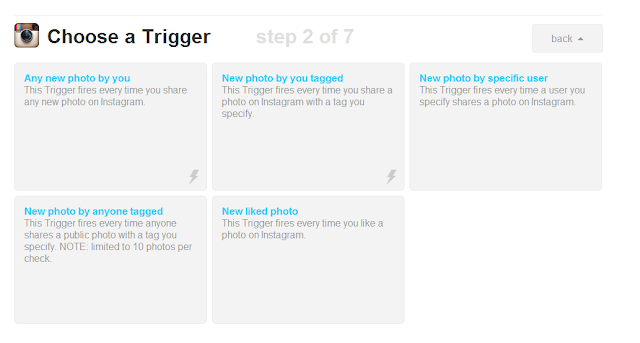
Pick out your trigger (where you want to get the info) - the this (click on this to get the list of sites and services supported).


I have to allow IFTTT access to my instagram account to link the two together.
 And authorize it...


Now I go through the activation and authorization process with Tumblr.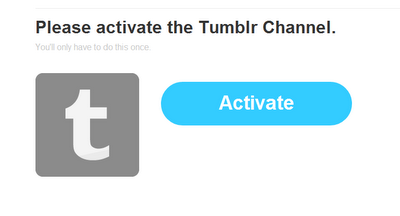

At this point I have some additional info that I need to provide to IFTTT. I can choose which blog (yes!) that I want to use.

Then I have to tell IFTTT what I actually want it to do. I've already told to get my new photos from Instagram (that is the trigger, the "this") so now I have to tell it what to do with those photos. I want to create a photo post (since this is images).

Under data from the trigger I am going to choose what I want information (not images - already have those covered through the "this" trigger) that I want to pull from Instagram. I am going to choose Caption because I want to include my captions from instagram; I also added some tags (IFTTT will suggest some). These tags will be applied to every image that IFTTT picks up (harvests) from Instagram. For the most part IFTTT and the ingredients list will populate this section, so you don't need to do much here. You don't need to do anything for the Photo URL or Photo caption fields; IFTTT fills those in based upon what you select in the ingredients list.

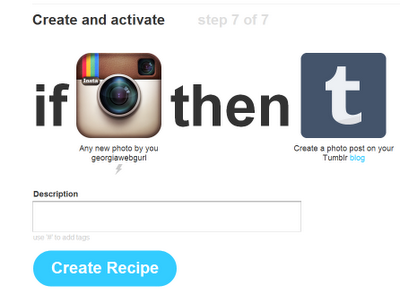 Almost done! We've setup our Instagram harvesting (how painless was that?) to get our images and we've told IFTTT where to put those images. We can give our recipe a description and then Create Recipe to activate!
Enjoy!
...but there is another way. (Isn't there always?) IFTTT always you to create "recipes" to push content... Wowza, why didn't I use IFTTT before?!?! It completely guides you through the process (essentially creating custom scripts)... just select!
So, we're going to create a recipe to push my instagram pix to my tumblr space (I'll talk more about tumblr later... it's just a blog space similar to blogger or wordpress.com and I've been trying to find ways to harvest my content without creating new content).
First of course, you have to login in with IFTTT...
Then create a new recipe..
Pick out your trigger (where you want to get the info) - the this (click on this to get the list of sites and services supported).

In this case I want to push instagram to tumblr. So I will choose instagram from the list (click on it to select).

I have to allow IFTTT access to my instagram account to link the two together.


Now I tell it what to do...
In this case, I am going to add photos to my tumblr blog, so I choose Any new photo by you

Now I finish the "trigger" process by clicking Create Trigger - this finishes the from Instagram part. In other words, at this point, I've created a script that will pick up my new photos from Instagram, but I haven't put them anywhere yet...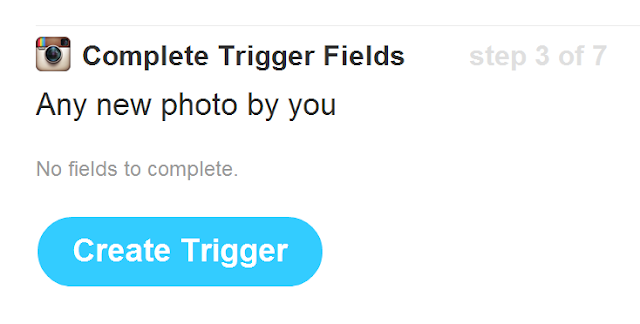

This process works similarly for all of the different tools. At this point, I could choose to push my photos to blogger or facebook or well... any of the sites supported by IFTTT. I'm going to choose Tumblr. Click on that. Notice that the "this" has changed to to instagram icon and below it is information about what it will do (my trigger).

Now, I'm back to the list of tools. So this time I select Tumblr.

Now I go through the activation and authorization process with Tumblr.


At this point I have some additional info that I need to provide to IFTTT. I can choose which blog (yes!) that I want to use.

Then I have to tell IFTTT what I actually want it to do. I've already told to get my new photos from Instagram (that is the trigger, the "this") so now I have to tell it what to do with those photos. I want to create a photo post (since this is images).

Under data from the trigger I am going to choose what I want information (not images - already have those covered through the "this" trigger) that I want to pull from Instagram. I am going to choose Caption because I want to include my captions from instagram; I also added some tags (IFTTT will suggest some). These tags will be applied to every image that IFTTT picks up (harvests) from Instagram. For the most part IFTTT and the ingredients list will populate this section, so you don't need to do much here. You don't need to do anything for the Photo URL or Photo caption fields; IFTTT fills those in based upon what you select in the ingredients list.

 Almost done! We've setup our Instagram harvesting (how painless was that?) to get our images and we've told IFTTT where to put those images. We can give our recipe a description and then Create Recipe to activate!
Woot! We are done! Now we get a quick overview of our recipe, and we can trash it, share it, or deactivate it. 

Enjoy!
Sunday, August 26, 2012
How to fix Instagram not posting to Facebook Timeline
Instagramers: Your photos may not be posting to timeline OR your news feed but will just go into an instagram folder at Facebook. IG is aware of the problem but seems more focused on the News Feed portion. My IG pix stopped posting 2 days ago and do not post to either the news feed or the timeline.
Here's the dets from IG: http://help.instagram.com/customer/portal/articles/493007-facebook-news-feed-share-not-working
I discovered that you can manually force instagram to post to your Facebook Timeline.

Click Activity Log:

Scroll to find your Instagram photos which did not post to your timeline.
Next to the icon as to who sees them is a circle, click on the circle. Change Allowed on Timeline to Shown on Timeline.You will need to do this for each item that is missing from your timeline.
Another way to see just your instagram photos:
http://www.facebook.com/yourusername/app_instapp
You will still need to choose shown on timeline.
Tuesday, December 20, 2011
Saturday, November 19, 2011
Getting your content from Facebook - for archiving, Google+ and more
So, you've written a lot of notes and would now like to turn them into a blog or perhaps you have a ton of photos on facebook but now need a copy of them - lost your originals (egads), or you'd like to move them to Flickr or Picasa (which is also shared thru to Google+).
There are a variety of ways to get your photos, some using extensions or addons (if you are a Chrome user and just want to move your photos from Facebook to Google+, try the Move2Picasa extension).If you know of other extensions or tools to do this, please just add them them in the comments (the software Facebook Album Downloader no longer works, btw).
Batch downloading from Facebook also gives you all of your content which you can then repurpose in a number of different ways - you get copies of your profile info, your wall, your notes, your messages, videos, pix, etc. in one organized and zipped file.
A few thoughts I had for how to repurpose Facebook content: turn your notes into a blog, use your profile info to craft your linkedin (or other bio information elsewhere on the web), copy or move your videos to Facebook, find messages, get copies of your photos to use for whatever, collectively turn all of your Facebook content into a personal diary/journal, and as a means to keep a personal archive.
What you will need: a way to unzip your folders to get to your photos, (I like 7File). an internet connection, Facebook access, and space to put your files (you may want to put them on a flash drive).
2. Click on Download a copy of your Facebook data
3. Click on Start my Archive (note this is just for your content - not your friend's photos)
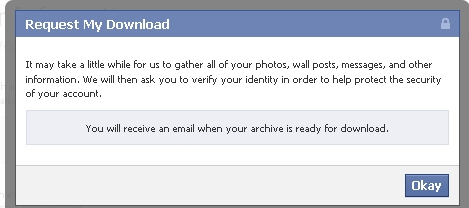
4. At this point, you will see another screen (Request My Download) Click on Start My Archive (again)
5. Now you wait. Request my download will display a message that you will be notified by email when your archive (data) is ready. Click on Okay. You can go do other things. Depending on how much data you have (I have alot of pix), it make take a day or so to receive the email.
6. You will receive an email (the email address affiliated with your facebook account) that says "Your download is ready". Follow the link to your data. This URL is unique for your info (you probably don't want to share it).
7. Re-enter your password and Click Continue.
8. Click on Download Archive.
9.Your download will be in a Zipped file. You have to unzip it order to use (I like 7File). It's free and easy to use.
Once you get your file unzipped, you will see folders for photos, video, html (all the content you've posted included your notes and wall) as well as index.html (your profile info). If you wanted to import your notes or wall into a blog, you would need to use the files within the html folder as a starting point.
For importing into Picasa for Google+, you can either use the Picasa Desktop software (then use Tools > Batch Upload), or a Chrome extension (Move2Picasa).
Here is the download process from Facebook via screencaptures:
1. Login to Facebook and Click on Account Settings then:

2. Click on Start My Archive
 3. Request my download

4. And now you wait for the email.
5. Wait for your email. You will receive an email that you use at Facebook with the subject"Your Download is Ready". Open the email and follow the link to start the download process. This URL is unique for your info (you probably don't want to share it).
6. Re-enter your password and Click Continue.

7. Click on Download Archive.
 8.Your download will be in a Zipped file. You have to unzip it order to use (I like 7File). It's free and easy to use. You will want to save your data and then unzip it so that you can get to your photos (or whatever else you want).

There are a variety of ways to get your photos, some using extensions or addons (if you are a Chrome user and just want to move your photos from Facebook to Google+, try the Move2Picasa extension).If you know of other extensions or tools to do this, please just add them them in the comments (the software Facebook Album Downloader no longer works, btw).
Batch downloading from Facebook also gives you all of your content which you can then repurpose in a number of different ways - you get copies of your profile info, your wall, your notes, your messages, videos, pix, etc. in one organized and zipped file.
A few thoughts I had for how to repurpose Facebook content: turn your notes into a blog, use your profile info to craft your linkedin (or other bio information elsewhere on the web), copy or move your videos to Facebook, find messages, get copies of your photos to use for whatever, collectively turn all of your Facebook content into a personal diary/journal, and as a means to keep a personal archive.
What you will need: a way to unzip your folders to get to your photos, (I like 7File). an internet connection, Facebook access, and space to put your files (you may want to put them on a flash drive).
Login to Facebook.
1. Go to Account Settings2. Click on Download a copy of your Facebook data
3. Click on Start my Archive (note this is just for your content - not your friend's photos)
4. At this point, you will see another screen (Request My Download) Click on Start My Archive (again)
5. Now you wait. Request my download will display a message that you will be notified by email when your archive (data) is ready. Click on Okay. You can go do other things. Depending on how much data you have (I have alot of pix), it make take a day or so to receive the email.
6. You will receive an email (the email address affiliated with your facebook account) that says "Your download is ready". Follow the link to your data. This URL is unique for your info (you probably don't want to share it).
7. Re-enter your password and Click Continue.
8. Click on Download Archive.
9.Your download will be in a Zipped file. You have to unzip it order to use (I like 7File). It's free and easy to use.
Once you get your file unzipped, you will see folders for photos, video, html (all the content you've posted included your notes and wall) as well as index.html (your profile info). If you wanted to import your notes or wall into a blog, you would need to use the files within the html folder as a starting point.
For importing into Picasa for Google+, you can either use the Picasa Desktop software (then use Tools > Batch Upload), or a Chrome extension (Move2Picasa).
Here is the download process from Facebook via screencaptures:
1. Login to Facebook and Click on Account Settings then:

2. Click on Start My Archive

4. And now you wait for the email.
5. Wait for your email. You will receive an email that you use at Facebook with the subject"Your Download is Ready". Open the email and follow the link to start the download process. This URL is unique for your info (you probably don't want to share it).
6. Re-enter your password and Click Continue.

7. Click on Download Archive.


Tuesday, June 7, 2011
250,000 new public domain images via Yale
http://dailybulletin.yale.edu/article.aspx?id=8544
"As works in these collections become digitized, the museums and libraries will make those images that are in the public domain freely accessible. In a departure from established convention, no license will be required for the transmission of the images and no limitations will be imposed on their use. The result is that scholars, artists, students, and citizens the world over will be able to use these collections for study, publication, teaching and inspiration.
The Yale treasures that are now accessible under the new policy are as wide-ranging as the collections themselves and include such diverse items as the war bonnet of Sioux chief "Red Cloud" from the Yale Peabody Museum of Natural History, a Mozart sonata in the composer's own hand from the Beinecke Rare Book and Manuscript Library, a 15th-century Javanese gold kris handle from the Indo-Pacific collection of Yale University Art Gallery and a watercolor by William Blake from the collection of prints and drawings in the Yale Center for British Art."
"As works in these collections become digitized, the museums and libraries will make those images that are in the public domain freely accessible. In a departure from established convention, no license will be required for the transmission of the images and no limitations will be imposed on their use. The result is that scholars, artists, students, and citizens the world over will be able to use these collections for study, publication, teaching and inspiration.
The Yale treasures that are now accessible under the new policy are as wide-ranging as the collections themselves and include such diverse items as the war bonnet of Sioux chief "Red Cloud" from the Yale Peabody Museum of Natural History, a Mozart sonata in the composer's own hand from the Beinecke Rare Book and Manuscript Library, a 15th-century Javanese gold kris handle from the Indo-Pacific collection of Yale University Art Gallery and a watercolor by William Blake from the collection of prints and drawings in the Yale Center for British Art."
Monday, August 9, 2010
Some of things I've taught over the years

Interesting how my interests have progressed over the years. (and these are just the ones I can remember and just to note this is an alphabetic title list).
Heh, the word web sure does appear alot ;-) Many of these are available via http://www.slideshare.net/robinfay/
You can always email me for more info. ;-)
..and guess what? I'm guest lecturing on digital identity, social networking, personal branding and digicred in 2 weeks; then on to GLA/COMO for 2 preconferences! Hopefully, I can squeeze in teaching a Drupal class, too. I know, whoa, busy!
Ask Technical Services Program (COMO/GLA; 2001) Co-Coordinated the Tech Services programs with the Chair through developing a potential topic list and identifying panel participants
Best New Technologies: Keeping up with the Storm Teleconference; (Discussion Leader 2006) Examining the challenges of Web 2.0 followed with a discussion of current Web 2.0 technologies and their use in the Libraries.
Bibliographic Data on the Semantic Web (discussion facilitator, 2009) Discussion on Martha Yee’s article on bibliographic data, RDA, and the Semantic Web.
Blog basics (Dweebs, a campus wide group; 2009) Lunch and Learn about various blog softwares and blog options, including an overview of Wordpress and the UGA Libraries’ experience.
Blogging & Tweeting (co-trainer, 10 Weeks to a 2.0 You program; 2010) Workshop on blogging and tweeting including hands on activities and homework.
Cataloging’s Del.icio.us links (Faculty meeting, panel presentation; 2007): Brief presentation on using Del.icio.us bookmarking tools to pull together various links into a centralized page on the Cataloging Department’s website.
Cataloging Fundamentals: Records and MARC Presentation (Media Specialist program; Gwinnett Campus; Guest Lecturer; 2006): Presentation on record structure, data field elements for MARC, and the relationships between records and databases, with followup questions and answers session on cataloging practices, policies, and databases.
Cataloging Tools Survey: Research in Progress (Academic Librarian Research Forum, Georgia Tech; by invitation; 2009) Overview of a 2008 survey of approximately 200 catalogers from variety of libraries across the United States.
Cataloging Tools online: Free resources (2009; USG Cataloging Committee, online/Wimba) Continuing education presentation on free cataloging resources.
Connecting with Connexion: The UGA Experience, co-presenter; graphic designer (GUGM). 2005) Powerpoint graphics, collaborated on content and discussion topics, and presented an overview of the UGA Connexion migration timeframe and training.
Creating web pages in Netscape, class & tutorial (PDR; 2002)
Two hour workshop on web design including hands-on activities; developed content and learning objectives for using Netscape Composer to create websites.
Digicred: do you have it? (2010, UGA class, guest lecturer); Discussion on social and professional networking, social media, branding, and digital identity.
Direct Link to the Patron: Web Tools to Expand Services (COMO/GLA; 2006): Co-presenter on how libraries use web based tools to market their services, educate their patrons, and provide value added services with an overview of the Libraries’ Blog and Report an Error mechanism.
Drupal 101 (UGADG: University of Georgia Drupal Group; 2009) Lunch and Learn introduction to Drupal; end result was the formation of the UGA Drupal Group.
Drupal for Libraries (Lyrasis; 2010- ) Introduction and overview of Drupal with a focus on libraries. Please see Lyrasis website for more info.
Emerging Technologies in Libraries (GPLS Director’s meeting, invited speaker; 2009) Presentation and discussion on current and emerging technologies in general and also in libraries.
Facebook, Privacy, and Your Digital Identity (Dweebs; 2009; encore 2010) Lunch and Learn/presentation about privacy, digital identity, and social media, focusing on Facebook. http://www.slideshare.net/robinfay/facebook-privacy-and-digital-identity
Flash, Bam, Alakazam! Photos in a 2.0 World (10 Weeks to a 2.0 You program; 2010) Workshop on online image editors, basic image editing and tips for good photography. Included hands on activities and homework.
GIL searching and reporting problems (UGA Libs Reference Department, 2002; co-trainer) One hour training session with identified training objectives including reporting discrepancies and errors found in the Libraries’ catalog (GIL).
He's a mentor, she's a mentor... wouldn't you like to be a mentor, too? Panel member (COMO/GLA, 2002) Presented an overview of the Mentor Program and facilitated discussion of mentoring within academic libraries.
Illusion: Insights Into Visual Design Elements, Co-presenter, Emerging Technologies Faculty Learning Community; 2010) Presentation on webdesign, color, and the elements of web design and how they can impact user experience.
Image Editing: It's not all about Photoshop (Dweebs; 2010) Lunch and Learn presentation about online image editors including video.
Issues in Cataloging and Bibliographic Maintenance Presentation (Media Specialist program; Gwinnett Campus; Guest Lecturer; 2006): Presentation on academic cataloging as it relates to bibliographic maintenance. Additionally, provided teaching assistance at follow-up hands on training session in creating MARC records.
Librarians and Faculty Learning Communities at UGA (PDRC; Panel Discussion Member, 2008) Discussion of experiences of being a member of Faculty Learning Communities.
Lip-smacking good: Web 2.0 technologies and your library blog (Co-presenter, COMO/GLA, 2007) Incorporating Web 2.0 technologies into blogging; includes overviews of Youtube, Flickr, del.icio.us, and using RSS feeds.
Metadata for Catalogers (USG, Cataloging Committee; online/Wimba; 2009) Continuing education presentation on metadata and how it fits into the cataloging profession.
Metadata 101 (UGA, Emerging Technologies Faculty Learning Community; 2009) Presentation of an overview of metadata as used on the web and by library communities.
News and Events Training Sessions, Co-trainer, 2005 One hour training session with identified training objectives, resources, and hands on exercises in the Libraries’ News & Events, an online Wordpress database.
News and Events Project Overview (DHG), 2005; Co-presenter Overview of blogs and blog history, summary of project process, and demo of the Libraries’ News and Events, a Wordpress database. http://www.robinfay.net/site/content/blogging-overview/
One Voice, Many Channels: Blogging and Tweeting for Libraries (COMO/GLA, 2010, Co-Presenter; invited preconference) Explores tweeting and blogging by academic libraries for sharing news, events, outreach, PR, marketing, and as a community building tool.
Open Systems, Closed Systems (University of Georgia/Freshman Seminar, Guest Lecturer; 2009) Presentation and discussion on the social media, opensource, community source, closed systems, and open systems.
Presentations that Rock! Advanced Powerpoint (PDRC workshop, 2008) Two hour workshop on extending Powerpoint to include video and real time websites, among other features. http://www.robinfay.net/site/powerpoint/
Reading the MARC Code: Understanding the Cataloging Record Presentation, Co-trainer (STEP Program, 2007) Presentation on intricacies of reading a MARC record, its relationship to the Libraries’ catalog, GIL, as well as tips for interpreting the parts of a technical display of a bibliographic, holding, and item record in GIL.
Semantic Web and the Social Web (University of Georgia/Master of Internet Technology Program; Gwinnett Campus; Guest Lecturer; 2009) Presentation and discussion on the metadata, the semantic web and its assumptions, as contrasted and compared with user generated content from social media sites. http://www.slideshare.net/robinfay/semantic-web-and-the-social-web
Semantic Web, Cataloging and Metadata (Valdosta State University, Guest Lecturer; 2010) Presentation and discussion on the metadata and the semantic web.
Simplify Your Inbox: Making RSS Work For You (UGA Libraries; Panel Discussion, 2009) Discussion panel on RSS including using Google Reader and reducing email by using RSS feeds.
Social Media Training: Tools You Can Use (Social Media for Government, 2010) Presentation and discussion of social media training tools, social media policies and more.
Web 2.0+ and Professional Networking: Are You LinkedIn? Panel Discussion (UGA; Coordinator/Facilitator; 2008) Social networking as used by those at the University of Georgia for professional networking purposes. Presentation also podcast.
What is Database Maintenance? Presentation (Media Specialist program; Gwinnett Campus; Guest Lecturer; 2004) Presentation on academic cataloging as it relates to bibliographic maintenance within the UGA Libraries. Additionally, provided teaching assistance at follow-up hands on training session in creating MARC records.
Wordpress overview (University of Georgia Public Relations Department; 2008) Overview of Wordpress and a discussion of some of their questions regarding how best to utilize Wordpress.
Your voice: Professional Networking using Social Media (GLA/COMO preconference, 2010) Personal branding, professional networking, using social networking effectively; includes a discussion of privacy, netiquette, and developing a personal social media policy.
Thursday, February 11, 2010
Photo booth software at home use...
I kind of wondered if photo booths would become a thing of the past (sigh, polaroid...) but at least one company is trying to move them to the home market. It does make you wonder a little if anyone will buy this....
http://www.partyboothapp.com/
http://www.partyboothapp.com/
Wednesday, July 22, 2009
Kodak ceases production of kodachrome ;-(
Kodak to Stop Making Kodachrome
By MIKE BARRIS
Eastman Kodak Co. will discontinue its iconic Kodachrone color film this year due to tumbling sales as photographers embrace newer Kodak films or digital imaging technology.
Kodak introduced the amateur color film in 1935 and it became the first commercially successful color film. But sales are just a fraction of 1% of the company's still-picture film revenue. The company doesn't break out such figures, but the segment in which Kodak's film sales are recorded had first-quarter revenue of $503 million.
That 31% drop from a year earlier highlights the woes the company has been undergoing. The company thought that when it completed a wrenching multiyear transition to having a digital focus at the end of 2007 that its restructuring was behind it. But a continued sales slump has resulted in more retrenchment -- Kodak in January announced plans to cut another 3,500 to 4,500 jobs, as much as 18% of its work force, this year.
Kodak estimates that current supplies of the film will last until early this fall.
The last rolls of the film will be donated to George Eastman House International Museum of Photography and Film in Rochester, which houses the world's largest collection of cameras and related artifacts. In addition, Steve McCurry -- known for a 1985 photo of a young Afghan girl peering from the cover of National Geographic magazine -- will shoot one of those last rolls and the images will be donated to Eastman House.
The Kodachrome output stoppage is another sign of the company's transition -- by 2004, the company that marketed its first snapshot camera in 1888 had stopped making film cameras.
http://online.wsj.com/article/SB124567093975236801.html
By MIKE BARRIS
Eastman Kodak Co. will discontinue its iconic Kodachrone color film this year due to tumbling sales as photographers embrace newer Kodak films or digital imaging technology.
Kodak introduced the amateur color film in 1935 and it became the first commercially successful color film. But sales are just a fraction of 1% of the company's still-picture film revenue. The company doesn't break out such figures, but the segment in which Kodak's film sales are recorded had first-quarter revenue of $503 million.
That 31% drop from a year earlier highlights the woes the company has been undergoing. The company thought that when it completed a wrenching multiyear transition to having a digital focus at the end of 2007 that its restructuring was behind it. But a continued sales slump has resulted in more retrenchment -- Kodak in January announced plans to cut another 3,500 to 4,500 jobs, as much as 18% of its work force, this year.
Kodak estimates that current supplies of the film will last until early this fall.
The last rolls of the film will be donated to George Eastman House International Museum of Photography and Film in Rochester, which houses the world's largest collection of cameras and related artifacts. In addition, Steve McCurry -- known for a 1985 photo of a young Afghan girl peering from the cover of National Geographic magazine -- will shoot one of those last rolls and the images will be donated to Eastman House.
The Kodachrome output stoppage is another sign of the company's transition -- by 2004, the company that marketed its first snapshot camera in 1888 had stopped making film cameras.
http://online.wsj.com/article/SB124567093975236801.html
Sunday, July 19, 2009
Old fashioned (ha!) film is better
.... at least for now. Digital even affects how I think about photography.http://www.thewrap.com/article/even-digital-age-studios-find-old-fashioned-film-best_4353?page=1
Friday, February 13, 2009
New art, new writings, podcasts & video -- it's moonshine
 The latest issue of moonshine, a magazine of the southern arts is available online (& free) at
http://www.moonshine.
-------------------------
A game of words -- a game of chance? What is love? Inspiration? Creativity? A reflection of ourselves? Our best selves? Our worst selves? This month we explore the many dimensions of being human from complex family dynamics to first love to the love of beauty and art... inspiration and creativity. The tie that binds --- Writings, music, paintings, photography... perhaps, by the light of the moon. Take a moment to find some inspiration in the work of Southern writers & artists.
Jasmine Rizer's Little Miss Straight-Edge Goes on Vacation (pt. 1) -- or is it? You can be the judge of that one! Lisa R. Taylor reflects on her family and shares Lies from my Grandmother (essay). Savannah writer Hunter Dasten presents 3 poems: A Ballerina's Dance (For Krysten Marie) (poetry); The Perfect Word; and Tightrope Walkers. Lost at Sea (poem) by Brenda Basham explores the depth of humanity, as does John S Moon who tells us about My True Love (poem). Georgia writer Niles Reddick shares Lead me Home (a novel excerpt), which focuses on the day-to-day, work relationships, and more. Despina Panagakos Yeargin asks The Questions of love, while McCabe Coolidge continues his series, Seven Questions with this question: Who do you think your guardian angel is? Thoughtful poetry from Russell Lee Hale I (a pair:Kiss Me Goodnight; Words Without), Sandy Vanderbleek (bite lip) and an enchanting tale of a roadtrip, Christopher Kupcho's Watermelon & Beer.
FROM THE STUDIO
Studio views features Sandra Babb's essay Powdered Pastels Demonstration (you'll never believe where she is painting now!!) and Jill Kettle interviews painter Durand Seay.
ON CREATIVITY AND THE CULTURE OF ART
Brenda Basham Dothage is having some Psychological Ponderings: Self-Esteem while Dorothy Birch explores A Season of Love -- I bet you will be surprised and delighted by this article, too -- but then, I'm not going to give away the secret!
ART & TECHNOLOGY
Donna Rosser aka the Barefoot Photographer shares her Digital photography basics while Robin Fay shares videos that she and her niece have made while exploring the latest underwater video cameras in Photography and Video to the Extreme.
REVIEWS
Our music review is a podcast by Hannah Leatherbury with Terrance Simien, music & more (podcast). Terrance performs his zydeco music and also reflects on his music and advice for other artists. Book reviews for February/March are Big Box Reuse by Julia Christensen, (book review by Jasmine Rizer), which explores what happens to the land and buildings after a bigbox retail store moves out.All the King's Horses and All the King's Friends by Ken Upright (book review by Rachel Anders) focuses on southern stories by regional storyteller, Ken Upright. Why I Came West: A Memoir by Rick Bass (book review by Heather Kline) is a memoir of travelling to the West. Andrew Shupling reviews the graphic novel Good as Lily by Derek Kirk Kim.
Check in with a Short Girl comix, book reviews, work from the Southerncreativity gallery (@ Flickr), art announcements & calls for entries.
Monday, December 8, 2008
new writings, art, & podcasts
I hate being sick ... but here ya go, it's the latest issue of moonshine.

The latest issue of moonshine, a magazine of the southern arts is available online (& free) in its entirety at
http://www.moonshine.southerncreativity.com
If you would like to contribute to moonshine or have art events for the art listings, please drop us a line at southerncreativity.com@gmail.com

v.2 no. 3
Nikki Estes discusses Finding and Securing Public Art Commissions (podcast), while Rachel Andres explores the Max Tharpe Exhibit Opening at Iredell Museum; Despina Panagakos Yeargin's
Recipe for the Holidays: Jake's Eggnog by the Fire is a treat (complete with recipe!), while Hannah Leatherbury shares colleague Allen Bell's interviews with filmmaker, Scott Chamberlin-Hoy.
 Are you feeling Merry ? Jasmine Rizer offers us a new story for the season; while McCabe Coolidge continues forward in his honest yet inspirational series, Seven Questions. Thoughtful poetry from Brenda L Basham (Breathless; Footsteps; Unknown Forces), Russell Lee Hale I (two new poems: December's Issue; Southern Comfort ), Hunter Dasten (The Dance; That Little Girl With Her Hands To The Sky ; When The Storm Comes Around), John S Moon (Beautiful Lady) , Sandy Vanderbleek (worlds) and Free-Form Friday: The Large Internal Stage and A Song of AEthelstan both by Gilbert Head.
 Studio views features Sandra Babb's essay on the Little Green Schoolhouse; Jill Kettles explores the Full Circle of Life – R. Sidney Henderson's Color Pencil Work; Hannah Leatherbury's audio interview (a podcast) with Phyllis Lear, mixed media artist and instructor explores the world of this multiple talented artist including how she was able to preserve some of her work prior to the arrival of Hurricane Gustav.
 Hannah Leatherbury shares colleague Allen Bell's interviews with filmmakers, Aprill Winney, filmmaker (podcast) and Ben Russell: photographer, curator, filmmaker (podcast); while Dorothy Birch provides some creative tips for Warming Up the Muse in Winter!
 Book reviews for December are Kokopelli: The Magic, Mirth, and Mischief of an Ancient Symbol by Dennis Slifer by Heather Kline, an in-depth exploration of the symbol of the flute-player in rock art in the prehistoric southwestern United States and the symbolic importance of flute as one of the most prevalent images in rock art around the world; Wacky Packages by The Topps Company by Andrew Shuping, a peek into the world of advertising, product development, and an usual product, Wacky Packages, spoof cards/stickers of real products.
Happy Holidays from Short Girl (Short Girl comix), book reviews, work from the Southerncreativity gallery (@ Flickr), art announcements & calls for entries.
If you would like to receive moonshine in its entirety via email, please drop us a line at southerncreativity.com@gmail.com Subject: Subscribe
Feedback? Comments? Want to contribute? Please drop us a line at southerncreativity.com@gmail.com
The latest issue of moonshine, a magazine of the southern arts is available online (& free) in its entirety at
http://www.moonshine.
If you would like to contribute to moonshine or have art events for the art listings, please drop us a line at southerncreativity.com@gmail.
v.2 no. 3
All shopped out? Too harried, too tired to think? Too stressed? Take a moment to enjoy a few free gifts of the season -- new writings, new art, artist interviews, podcasts, writings from the studio, inspiration, new art, photography, new reads, & more -- all from the wonderful crew at moonshine!
Step back, feed your mind and soul, and raise a toast to a new year.
Nikki Estes discusses Finding and Securing Public Art Commissions (podcast), while Rachel Andres explores the Max Tharpe Exhibit Opening at Iredell Museum; Despina Panagakos Yeargin's
Recipe for the Holidays: Jake's Eggnog by the Fire is a treat (complete with recipe!), while Hannah Leatherbury shares colleague Allen Bell's interviews with filmmaker, Scott Chamberlin-Hoy.
Are you feeling Merry ? Jasmine Rizer offers us a new story for the season; while McCabe Coolidge continues forward in his honest yet inspirational series, Seven Questions. Thoughtful poetry from Brenda L Basham (Breathless; Footsteps; Unknown Forces), Russell Lee Hale I (two new poems: December's Issue; Southern Comfort ), Hunter Dasten (The Dance; That Little Girl With Her Hands To The Sky ; When The Storm Comes Around), John S Moon (Beautiful Lady) , Sandy Vanderbleek (worlds) and Free-Form Friday: The Large Internal Stage and A Song of AEthelstan both by Gilbert Head.
Studio views features Sandra Babb's essay on the Little Green Schoolhouse; Jill Kettles explores the Full Circle of Life – R. Sidney Henderson's Color Pencil Work; Hannah Leatherbury's audio interview (a podcast) with Phyllis Lear, mixed media artist and instructor explores the world of this multiple talented artist including how she was able to preserve some of her work prior to the arrival of Hurricane Gustav. Donna Rosser finds the Gifts for the Photographer on Your List while robin fay explores the social networking phenom, twitter in Tweets, Twitter, and Twitpix -- U understand?
Hannah Leatherbury shares colleague Allen Bell's interviews with filmmakers, Aprill Winney, filmmaker (podcast) and Ben Russell: photographer, curator, filmmaker (podcast); while Dorothy Birch provides some creative tips for Warming Up the Muse in Winter! Book reviews for December are Kokopelli: The Magic, Mirth, and Mischief of an Ancient Symbol by Dennis Slifer by Heather Kline, an in-depth exploration of the symbol of the flute-player in rock art in the prehistoric southwestern United States and the symbolic importance of flute as one of the most prevalent images in rock art around the world; Wacky Packages by The Topps Company by Andrew Shuping, a peek into the world of advertising, product development, and an usual product, Wacky Packages, spoof cards/stickers of real products.Happy Holidays from Short Girl (Short Girl comix), book reviews, work from the Southerncreativity gallery (@ Flickr), art announcements & calls for entries.
If you would like to receive moonshine in its entirety via email, please drop us a line at southerncreativity.com@gmail.
Feedback? Comments? Want to contribute? Please drop us a line at southerncreativity.com@gmail.
Wednesday, October 15, 2008
Artwork at GLA/COMO to benefit Hubbard Scholarship

Whoa is there some cool stuff at GLA/COMO including one of my large mixed media/paintings, starry meadow:
diptych
handmade & tissue paper, fabric, beads, silver flake, oil stick on canvas
2006
Wednesday, October 8, 2008
new art, new writings, new music -- it's moonshine

The latest issue of moonshine is up. Whew, that was tough work! The stylesheet has changed to dark with light text for the cover; not sure if I will keep it, but it seemed aprops for the time of year. It almost seems a little too much "me" which I suppose is okay, but I'm going to try to do something completely different with December's issue. Part of the problem is that most of the webwork I do is very institutional looking, so when I get a chance, I really try to break out of that mold.
I'm also never sure if I am happy with my graphics work by the time I finish. This design is no different. I liked my pumpkin and bones okay to begin with, but welll...
Artistically speaking, I usually hate whatever I am working on by this point -- yet I somehow feel that it is done. I don't know how to explain that -- you either get it or you don't. ;-)
However, writing wise, this issue is really solid. I love the podcasts, too!
Also, if you want to get the issue online complete with images, drop me a line. As always, always, always looking for writers.
I would love some feedback.
-------------------------
These days and nights, the winds of culture, politics, and everything else seem to change at the drop of the hat. So what do artists do in such unpredictable times? Sometimes change can be an unforeseen catalyst, whipping up all sorts of artistic delights --- Writings, music, paintings, photography... perhaps, by the light of the moon. Take a moment to find some inspiration in the work of Southern writers & artists.
ORIGINAL WRITINGS
Jasmine Rizer's lively serial, "Keeping it in the Family" concludes; Part 1 is available at "Keeping it in the Family"; Karen Hennessee finds the maroon while Brenda Basham reflects on the Greatest Romantic Story ; Sandra Jones Cropsey answers, Who's there? , while McCabe Coolidge continues his series, Seven Questions with this question: How did your Robin die? Thoughtful poetry from Brenda L Basham (Images) , Russell Lee Hale I (a pair: I Know Not, The Mask; The Mask ), John S Moon (Lonely Soldier) , Sandy Vanderbleek (he) and a collection of Haikus by Gilbert Head.
FROM THE STUDIO
Studio views features Sandra Babb's essay on Politely Painting the Preacher Lady; Despina Panagakos Yeargin thinks vibrant and funky painter, Jeffrey Callaham is in Love -- check out her interview and his work to see for yourself! Photographer Frank Hamrick reflects on the goodness of growing your food and finds inspiring subjects for photography, too. Hannah Leatherbury's audio interview (a podcast) with fiber sculpture artist Justine Dennis delves into this quirky artist's mind. Allen Bell and Hannah Leatherbury also encourage you to Steal this Idea! (courtesy of the Southern Arts Federation).
ON CREATIVITY AND THE CULTURE OF ART
robin fay continues to explore Creativity (pt. 6 in a series, focusing on the role of artists in society) while Rachel Anders explores the art and music in her neighborhood in The Arts in Iredell County. Hannah Leatherbury shares colleague Allen Bell's interviews with participants in the Southern Circuit Tour, a tour of independent films, in Southern Circuit Tour, interview with filmmaker, Jed Riffe and Southern Circuit Tour interviews with filmmaker, Muhammad Naqvi ; both are podcasts with Muhammad Naqvi's article including a video clip of the trailer for his film Shame. Regular contributor Brenda Basham reflects on Psychological Ponderings: Quality Equality; while Dorothy Birch offers us some tips for Stoking Your Creative Fires This Fall. as well as some colorful seasonal photos.
ART & TECHNOLOGY
Donna Rosser aka the Barefoot Photographer shares her Fall Photo Opportunities and enchanting photographs with us.
REVIEWS
Book reviews for October are Enclosure by Andy Goldsworthy reviewed by Andrew Shupling, a book of work by ephemeral artist, Andy Goldsworthy, who works with items in nature, such as rocks, leaves, snow, and even the rain as it falls on the ground;
Three Shadows reviewed by Andrew Shupling, a graphic novel by Cyril Pedrosa (a former Disney illustrator) and Dali & I: The Surreal Story by Stan Lauryssens reviewed by Heather Kline, an interesting insight into both the contemporary art market and the creation of the Dalí persona. Music matters features a review of Down the Road I'll Go, by Curt Bouterse, "fret-less oldtime music"; while Hannah Leatherbury talks with Reuben Hoch of the Chassidic Jazz Project, a group who fills voids in both the Jazz and World music genres. (courtesy of the Southern Arts Federation).
Check in with a Short Girl comix, book reviews, work from the Southerncreativity gallery (@ Flickr), art announcements & calls for entries.
Find the sublime by the light of the moon.

Subscribe to:
Comments (Atom)