
Showing posts with label mobile. Show all posts
Showing posts with label mobile. Show all posts
Monday, June 16, 2014


Thursday, May 8, 2014

Tuesday, March 18, 2014
File in Android SDK moves, causes issues for other products "missing SDK" or can not find SDK error messages
I discovered the hard way when I was trying to use Droid Explorer, that the SDK file structure has been rearranged.
In the case of Droid Explorer (a product that allows you to edit and build through access to the system files via a PC desktop), it was pointing to a file in SDK in the platform-tools folder, which has been moved into the build-tools folder. Apparently a lot of different tools have a similar issue. I copied aapt.exe over to platform-tools and everything seems to be working now.
I don't do much with mobile stuff and it's always on an occasional basis, but one of the first things I learned to do with an early phone was root to optimize and extend their abilities (I hung onto my QWERTY keyboard as long as I could) so being able to have these tools is useful.
Posting here in case it helps others (there are other posts on the web about the same issue) but also as a bookmark for myself when I need this info again. :-)
In the case of Droid Explorer (a product that allows you to edit and build through access to the system files via a PC desktop), it was pointing to a file in SDK in the platform-tools folder, which has been moved into the build-tools folder. Apparently a lot of different tools have a similar issue. I copied aapt.exe over to platform-tools and everything seems to be working now.
I don't do much with mobile stuff and it's always on an occasional basis, but one of the first things I learned to do with an early phone was root to optimize and extend their abilities (I hung onto my QWERTY keyboard as long as I could) so being able to have these tools is useful.
Posting here in case it helps others (there are other posts on the web about the same issue) but also as a bookmark for myself when I need this info again. :-)
Monday, April 1, 2013
usability testing mobile for cats
Other common sources of irritation were the pointless presence of instructions as well as any other use of the English language. While human users rarely read instructions, the users in this study didn’t read at all.
(there are definitely some user experience and usability points being made here... despite the obvious fun of the whole article - enjoy!)Tuesday, February 12, 2013

Sunday, August 26, 2012
How to fix Instagram not posting to Facebook Timeline

Instagramers: Your photos may not be posting to timeline OR your news feed but will just go into an instagram folder at Facebook. IG is aware of the problem but seems more focused on the News Feed portion. My IG pix stopped posting 2 days ago and do not post to either the news feed or the timeline.
Here's the dets from IG: http://help.instagram.com/customer/portal/articles/493007-facebook-news-feed-share-not-working
I discovered that you can manually force instagram to post to your Facebook Timeline.

Click Activity Log:

Scroll to find your Instagram photos which did not post to your timeline.
Next to the icon as to who sees them is a circle, click on the circle. Change Allowed on Timeline to Shown on Timeline.You will need to do this for each item that is missing from your timeline.
Another way to see just your instagram photos:
http://www.facebook.com/yourusername/app_instapp
You will still need to choose shown on timeline.
Friday, April 8, 2011
Free education/technology conference (mobile, Ipads, emerging technologies)
Free online/virtual conference , April 28th
Mobile learning evangelists Elliot Soloway and Cathleen Norris present their session, "The Educational Reset of 2011: Mobile Learning" The pros and cons of mobile learning are important topics for educators looking to reach this new generation of digital natives.
Other sessions include: iThink iNeed iPods, iPhones and iPads in the Classroom and sessions on Emerging Technologies. Register here: http://fetc.org/events/virtual-conference/information/schedule.aspx
Mobile learning evangelists Elliot Soloway and Cathleen Norris present their session, "The Educational Reset of 2011: Mobile Learning" The pros and cons of mobile learning are important topics for educators looking to reach this new generation of digital natives.
Other sessions include: iThink iNeed iPods, iPhones and iPads in the Classroom and sessions on Emerging Technologies. Register here: http://fetc.org/events/virtual-conference/information/schedule.aspx
Monday, March 14, 2011
Controlling twitter notifications to your phone
Go to Settings>Mobile
Text message notifications:
Twitter will send alerts to your phone, depending on your settings. You can limit it to particular times (I would not want to receive alerts in the middle of the night), or particular types of messages. You can limit to only those you allow to send to send alerts via twitter (perhaps, your family, dearest friends, or your boss, if you tweet for work); to direct messages, as well as mentions and replies.
So, you'll want to think about how many times you want twitter to alert your phone and for what. If you do not want twitter to alert you for any reason, make sure all of the notification messages are UNCHECKED.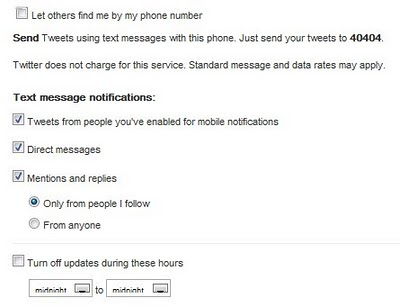
Text message notifications:
Twitter will send alerts to your phone, depending on your settings. You can limit it to particular times (I would not want to receive alerts in the middle of the night), or particular types of messages. You can limit to only those you allow to send to send alerts via twitter (perhaps, your family, dearest friends, or your boss, if you tweet for work); to direct messages, as well as mentions and replies.
So, you'll want to think about how many times you want twitter to alert your phone and for what. If you do not want twitter to alert you for any reason, make sure all of the notification messages are UNCHECKED.

Tuesday, March 8, 2011
Question of the day: Tweet from your mobile phone (or change your number)
I know this info is available online, but it's my question of the day, so here goes. ;-)
Note> You can set it up twitter to use web or wifi if you have a smartphone; in that case, you may just want to use the appropriate Twitter app for your phone: Iphone; or Android (ton of choices).
On your menu bar, choose> Settings

On the Settings page> Choose Mobile
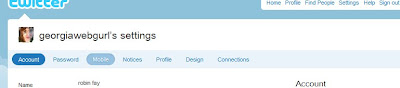
Use Twitter for text messaging!
1. Choose your country from dropdown.
2. Input your phone no. (change it here if you need to)
>Let others find me by my phone number: That is up to you, but think carefully about that.
Note the cheatsheet for Text Messaging on Twitter; you can always get back to this info via this screen, if needed.
3. Verify your phone> Click start (make sure your phone is on!) (Twitter will then connect with your phone; you must text twitter back in order to complete the process.)
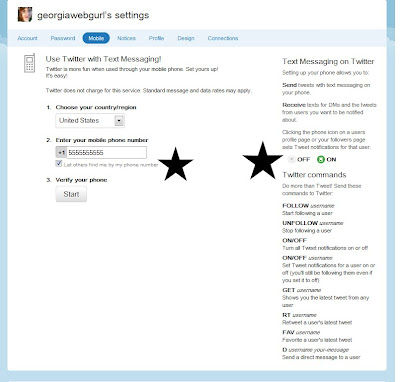
4. Verifying your phone - linking it to your twitter account
The shortcode for the U.S. is 40404; other codes can be found here
Once you receive a message from twitter, you will text back to your shortcode (in my case 40404) the message GO
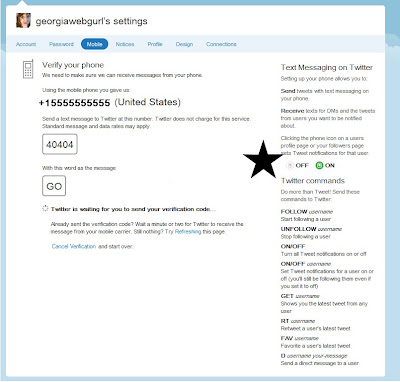
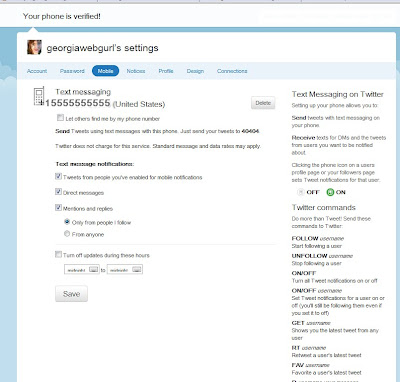 Once you do that it's done, but you do want to take a look at privacy, security, and CONVENIENCE settings.
Let others find me by my phone number: if you are trying to stay private, you may not want to turn this on.
Text message notifications:
Twitter will send alerts to your phone, depending on your settings. You can limit it to particular times (I would not want to receive alerts in the middle of the night), or particular types of messages. You can limit to only those you allow to send to send alerts via twitter (perhaps, your family, dearest friends, or your boss, if you tweet for work); to direct messages, as well as mentions and replies.
So, you'll want to think about how many times you want twitter to alert your phone and for what. If you do not want twitter to alert you for any reason, make sure all of the notification messages are UNCHECKED.
Note> You can set it up twitter to use web or wifi if you have a smartphone; in that case, you may just want to use the appropriate Twitter app for your phone: Iphone; or Android (ton of choices).
On your menu bar, choose> Settings
On the Settings page> Choose Mobile

Use Twitter for text messaging!
1. Choose your country from dropdown.
2. Input your phone no. (change it here if you need to)
>Let others find me by my phone number: That is up to you, but think carefully about that.
Note the cheatsheet for Text Messaging on Twitter; you can always get back to this info via this screen, if needed.
3. Verify your phone> Click start (make sure your phone is on!) (Twitter will then connect with your phone; you must text twitter back in order to complete the process.)

4. Verifying your phone - linking it to your twitter account
The shortcode for the U.S. is 40404; other codes can be found here
Once you receive a message from twitter, you will text back to your shortcode (in my case 40404) the message GO

 Once you do that it's done, but you do want to take a look at privacy, security, and CONVENIENCE settings.
Let others find me by my phone number: if you are trying to stay private, you may not want to turn this on.
Text message notifications:
Twitter will send alerts to your phone, depending on your settings. You can limit it to particular times (I would not want to receive alerts in the middle of the night), or particular types of messages. You can limit to only those you allow to send to send alerts via twitter (perhaps, your family, dearest friends, or your boss, if you tweet for work); to direct messages, as well as mentions and replies.
So, you'll want to think about how many times you want twitter to alert your phone and for what. If you do not want twitter to alert you for any reason, make sure all of the notification messages are UNCHECKED.
Monday, December 6, 2010
eink, ereader, tablets, hybrids, oh my! what do I buy?
my shopping list:
LOL
- definitely need color screen for video and photos.
- speaking of photos ... need a built in camera.
- not too big, not too little (10.2 inches seems about right
- not too heavy or thick
- dualcore processor think is a necessity
- wifi possibly bluetooth
- usb
- SD card slots
- Less than 1000$
- eink
- keyboard (external usb keyboard ok)
- flash support (til the web world catches up with HTML5)
- reading
- watching movies
- social gaming
- running presentations at conferences
- perhaps, uploading photos to flickr
- travel!
LOL
Saturday, October 23, 2010
LibraryAnywhere rolls out as an iphone app
In case you haven't heard about this (some of us have chatted in my lib about this), it really looks cool.
Library Anywhere, a mobile catalog for everyone (and they just rolled out a new iphone app too)
Following on our announcement of Shelf Browse, here’s another new product. We think this one’s a pretty big deal.
Announcing Library Anywhere! Check it out on our ALA handout (available here).
* A mobile catalog for any library, up and running in minutes.
* Mobile web and apps for iPhone, Blackberry and Android.
* Cheaper than you’d guess.
* Search, place holds, and more.
* Showcase hours, branches, and events.
* No installation process.
* Works with 90% of current OPACs.
* Comes with an “accessible version” that provides a fully Section 508-compliant version of your existing catalog.
Unlike Shelf Browse, available now, Library Anywhere is “coming soon.” So, we’re looking for beta libraries.
Iphone app
http://itunes.apple.com/us/app/libanywhere/id397718881?mt=8
Library Anywhere, a mobile catalog for everyone (and they just rolled out a new iphone app too)
Following on our announcement of Shelf Browse, here’s another new product. We think this one’s a pretty big deal.
Announcing Library Anywhere! Check it out on our ALA handout (available here).
* A mobile catalog for any library, up and running in minutes.
* Mobile web and apps for iPhone, Blackberry and Android.
* Cheaper than you’d guess.
* Search, place holds, and more.
* Showcase hours, branches, and events.
* No installation process.
* Works with 90% of current OPACs.
* Comes with an “accessible version” that provides a fully Section 508-compliant version of your existing catalog.
Unlike Shelf Browse, available now, Library Anywhere is “coming soon.” So, we’re looking for beta libraries.
Iphone app
http://itunes.apple.com/us/app/libanywhere/id397718881?mt=8
Wednesday, July 28, 2010
Free mobile/smart device summit
With the proliferation of smart devices (smartphones, tablet devices), local governments are developing applications that make government services and information more accessible and government more responsive to the public.
PTI is hosting this half-day, web-based Virtual Summit on Apps for Local Government that will look at the opportunities that mobile apps can provide, as well as explore the policy and management implications of creating and implementing these apps.
This exciting web event will begin with an overview of why local governments are moving into the rapidly changing waters of mobile apps. Then, three local governments – Boston, MA, Miami-Dade County, FL, and New York, NY will share their experiences with mobile apps.
The entire educational event is presented free of charge and is designed for anyone interested in the development or implementation of apps for local government. Local officials can attend the entire meeting or sign-on for just the portions that are of interest.
TODAY: Virtual Summit on Apps for Local Government 1:00-4:30 PM ET http://j.mp/cVVVCP
---------------------
PTI is hosting this half-day, web-based Virtual Summit on Apps for Local Government that will look at the opportunities that mobile apps can provide, as well as explore the policy and management implications of creating and implementing these apps.
This exciting web event will begin with an overview of why local governments are moving into the rapidly changing waters of mobile apps. Then, three local governments – Boston, MA, Miami-Dade County, FL, and New York, NY will share their experiences with mobile apps.
The entire educational event is presented free of charge and is designed for anyone interested in the development or implementation of apps for local government. Local officials can attend the entire meeting or sign-on for just the portions that are of interest.
TODAY: Virtual Summit on Apps for Local Government 1:00-4:30 PM ET http://j.mp/cVVVCP
---------------------
Wednesday, March 31, 2010
Developing mobile, scrolling horizontally, undergrads usage of wikipedia (links, links)
Just a couple of various links from various places:
how to build mobile versions of existing sites, including links to some mobile site building tools:
http://designshack.co.uk/articles/css/quick-tips-for-creating-a-mobile-optimized-site
How undergraduates use wikipedia:
http://www.uic.edu/htbin/cgiwrap/bin/ojs/index.php/fm/article/view/2830/2476
scrolling horizontally!
https://xd.adobe.com/#/articles/article/530
direct link to the horizontally scrolled page:
http://www.thinkingforaliving.org/
how to build mobile versions of existing sites, including links to some mobile site building tools:
http://designshack.co.uk/articles/css/quick-tips-for-creating-a-mobile-optimized-site
How undergraduates use wikipedia:
http://www.uic.edu/htbin/cgiwrap/bin/ojs/index.php/fm/article/view/2830/2476
scrolling horizontally!
https://xd.adobe.com/#/articles/article/530
direct link to the horizontally scrolled page:
http://www.thinkingforaliving.org/
Monday, March 1, 2010
Mobile dev resources
For those of you developing for mobile devices... I know, I should be...
great list from a friend...
-------------------------
The Complete iPhone Development Toolbox
a list of blogs,tutorials,screencastss,code snippets, and bookss
http://iphone.appstorm.net/roundups/developer/the-complete-iphone-development-toolbox/
A great list of links for creating mobile enabled sites
18 Mobile Frameworks and Development Tools for Creating iPhone Apps
http://iphoneized.com/2009/11/18-mobile-frameworks-development-tools-creating-iphone-apps/
great list from a friend...
-------------------------
The Complete iPhone Development Toolbox
a list of blogs,tutorials,screencastss,code snippets, and bookss
http://iphone.appstorm.net/roundups/developer/the-complete-iphone-development-toolbox/
A great list of links for creating mobile enabled sites
18 Mobile Frameworks and Development Tools for Creating iPhone Apps
http://iphoneized.com/2009/11/18-mobile-frameworks-development-tools-creating-iphone-apps/
Tuesday, February 16, 2010
Free mobile learning/education webinar
Sorry for the late notice, this just came across my desk.
As far as I can see, it is free.
-------------------------------
https://www1.gotomeeting.com/register/948880016
Mobile Learning Fundamentals: Innovation Showcase and Real-World Examples - Presented by A.J. Ripin with special guest, Dr. David Metcalf
The way that we live, work, play, and learn is being impacted by the increasing mobility of our global society. As leaders, it is our responsibility to design for the needs of our changing audience. Learn the key trends and technologies that are fast emerging to meet the challenges and changes of today and tomorrow.
Come hear this conversation as we explore advanced concepts like mobile performance support, compliance, games and simulations, location awareness, transcoding, mobile social networking and collaboration. Learn firsthand how world leaders from industry, academia, military and organizations like Google, Microsoft, Tyco International, Tufts University and others are delivering value through Mobile Learning content.
“Mind over Technology” – The value of content design in “mobile education” - Presented by Supra Manohar, EVP Emantras
The discussion of mobility in education has primarily focused on technology and devices. It is critical to understand that the maturation of the market is driving the need for understanding content design and why it is probably one of the most critical aspects of any mobile learning initiative.
Understanding how we learn in specific environments is critical to learning design. Using online content without pedagogical modifications within mobile environments probably does not work. The primary thrust of mobile education must be the design of the content and utilization of technology to deliver this content. This presentation will explore learning design for mobile environments and critical factors that need to be considered for a successful initiative (relative to content).
As far as I can see, it is free.
-------------------------------
https://www1.gotomeeting.com/register/948880016
Mobile Learning Fundamentals: Innovation Showcase and Real-World Examples - Presented by A.J. Ripin with special guest, Dr. David Metcalf
The way that we live, work, play, and learn is being impacted by the increasing mobility of our global society. As leaders, it is our responsibility to design for the needs of our changing audience. Learn the key trends and technologies that are fast emerging to meet the challenges and changes of today and tomorrow.
Come hear this conversation as we explore advanced concepts like mobile performance support, compliance, games and simulations, location awareness, transcoding, mobile social networking and collaboration. Learn firsthand how world leaders from industry, academia, military and organizations like Google, Microsoft, Tyco International, Tufts University and others are delivering value through Mobile Learning content.
“Mind over Technology” – The value of content design in “mobile education” - Presented by Supra Manohar, EVP Emantras
The discussion of mobility in education has primarily focused on technology and devices. It is critical to understand that the maturation of the market is driving the need for understanding content design and why it is probably one of the most critical aspects of any mobile learning initiative.
Understanding how we learn in specific environments is critical to learning design. Using online content without pedagogical modifications within mobile environments probably does not work. The primary thrust of mobile education must be the design of the content and utilization of technology to deliver this content. This presentation will explore learning design for mobile environments and critical factors that need to be considered for a successful initiative (relative to content).
Tuesday, November 17, 2009
Social media in libraries survey
My Group (Emerging Technologies Group) is taking the survey today.
--------------
Please forward this survey to library colleagues, state library association listservs, or others who may be interested.
Thank you for taking time to respond to this survey on American libraries using Social Media tools for PR/Marketing. It should only take 10-15 minutes to complete. It is a follow up to a survey of the same type conducted March 2009.
The survey will end on Wednesday November 25, 2009, 5:00pm EST.
If you have any questions, please contact me at crogers@statelibrary.sc.gov.
SURVEY LINK:
http://www.surveymonkey.com/s.aspx?sm=o9433u_2bftvRWRR7veARsoA_3d_3d
IF ABOVE LINK DOES NOT WORK, PLEASE TRY:
http://tinyurl.com/yjxht3f
Wednesday, July 23, 2008
Library news roundup: nexgen catalogs, institutional repositories, and more
Well, since I have so many little library related tidbits floating around in my reader, I'm just going to do a roundup:
- Over at the shifted librarian, she has a nice blog post about the new startup project, bibliocommons @ the Oakville, Ontario library, to build a library catalog interface from scratch. The interface includes things like reviews, tagging, faceted searching, etc. Looks very drupalesque to me.
- A few discussions about defining repository and of course, wikipedia's definition.
- Pew statistical study on blog reading: "' Do you ever read someone else's online journal or blog?'. In total, 33% of internet users (the equivalent of 24% of all adults) say they read blogs, with 11% of internet users doing so on a typical day. " I wonder how many people read blogs without knowing they are reading a blog.
- EDUCause's 7things you should know about Wii (I always think the 7things series are just great!) including an overview of what it is and how it works, why it is important, and how it can be used for teaching and learning.
- From Equinox's blog, Five public libraries and one academic moved to the opensource Evergreen library catalog software. Approximately 30 more migrations are in the works.
- Mobile! Mobile! Mobile! Honestly, if you're already tired of hearing about the iphone, just wait until Google's Android hits. On the move with mobile web; Semantic web, mobiles and libraries picking up the pace; the catalog in your hand; and just google iphone or android, for the billions of articles and blogposts about them. ;-)
Subscribe to:
Posts (Atom)