Showing posts with label software. Show all posts
Showing posts with label software. Show all posts
Friday, August 1, 2014


Thursday, March 20, 2014
Exploring Omeka - repository software
I'm still in the process of exploring repository software. Here is my brief overview with some examples.
Omeka has a lot to offer for a learning objects repository but it doesn't handle textual documents so well.
Omeka has a lot to offer for a learning objects repository but it doesn't handle textual documents so well.
Exploring Omeka from robin f
Monday, February 7, 2011
Logi Insight for Libraries with Voyager ILS (Webinar)
Logi Insight for Libraries with Voyager ILS
Featuring Kevin Kidd, Manager of Libraries, Boston College
Date & Time: Tuesday, February 15, 2011 at 1pm EST
Duration: 45 minutes
Presenters: Kevin Kidd, Manager of Libraries, Boston College
Matt Hoffman, Director of Library Solutions, LogiXML
Who Should Attend: Deans, Systems Librarians, Electronic Resources Librarians, etc.
Join us for a webinar on our new reporting solution for academic libraries using the Voyager ILS. Boston College, Texas Tech, and NYU have partnered with us to develop this solution that enables librarians to instantly evaluate and understand resource utilization to support data-driven decision-making.
Learn about becoming a charter partner and see a live demo of our new Dean's Dashboard!
* Budget Status Gauge
* Circulation Trend Chart
* Cataloging Productivity
* And much more!
Live Webinar: Tuesday, February 15, 2011 at 1pm EST
Featuring Kevin Kidd, Manager of Libraries, Boston College
Date & Time: Tuesday, February 15, 2011 at 1pm EST
Duration: 45 minutes
Presenters: Kevin Kidd, Manager of Libraries, Boston College
Matt Hoffman, Director of Library Solutions, LogiXML
Who Should Attend: Deans, Systems Librarians, Electronic Resources Librarians, etc.
Join us for a webinar on our new reporting solution for academic libraries using the Voyager ILS. Boston College, Texas Tech, and NYU have partnered with us to develop this solution that enables librarians to instantly evaluate and understand resource utilization to support data-driven decision-making.
Learn about becoming a charter partner and see a live demo of our new Dean's Dashboard!
* Budget Status Gauge
* Circulation Trend Chart
* Cataloging Productivity
* And much more!
Live Webinar: Tuesday, February 15, 2011 at 1pm EST
Monday, November 8, 2010
Twitter for librarians
Tools I use:
To future/schedule tweets
[I follow more non-library people than I do librarians, but that's because my interests range way beyond traditional library work]
To future/schedule tweets
- Future tweets
- Brizzly
- Brizzly
- delicious to twitter (links)
- picnik (twitpic) to twitter (images)
- TwitterKarma: see follows/unfollows and when they posted last (can be slow)
- Mytweeple: same as above with a little more info
- Klout
- Twitterstatistics
- @libraryfuture
[I follow more non-library people than I do librarians, but that's because my interests range way beyond traditional library work]
Sunday, December 13, 2009
National Historical Park database with Edison-era sound recordings
Sounds interesting....
---------------
The National Park Service (NPS) Library Program recently loaded the Thomas Edison National Historical Park (TENHP) MARC-format database of recorded sound holdings into the NPS Voyager catalog.  The NPS
Voyager catalog is available for public searches on-line at http://www.library.nps.gov/ .

The TENHP database in Voyager includes MARC-format data for the 10,000 cylinder records and 28,000 disc records preserved at Edison’s Laboratory in West Orange, New Jersey.  The majority of the phonograph records in the collection are Edison recordings made between 1888 and 1929.  The collection also includes some Edison-era
recordings made by competing companies.  The project to create the MARC-format database began in 1995 and completed in 2005.

To limit a search in Voyager to the TENHP records only, follow these
steps:
- Go to the NPS Library Information center, on-line at
http://www.library.nps.gov/
- Under "NPS Voyager Catalog", click on "search."
- Choose "Basic Search".
- Click on the list titled "Optionally limit to major NPS library."
- Choose TENHP, listed under "Major Park Libraries."

For more information, please contact:
Jerry Fabris, Museum Curator
Thomas Edison National Historical Park
National Park Service
United States Department of the Interior
211 Main Street
West Orange, New Jersey 07052
tel:  (973) 736-0550, ext. 48
fax: (973) 736-8496
website: http://www.nps.gov/edis/index.htm
email:  gerald_fabris@nps.gov
Friday, November 20, 2009
Join us -- new Drupal and Expression Engine Groups
Hola! I'm chairing the ATHDrupal group and for now, I am just "helping" the EEATH group (I hope a Chair rises organically in the group).
ATHDrupal is a new regional Drupal group (forming out of the ashes of UGA Drupal Group). We would like to invite anyone interested in Drupal to join us. We hope to have some f2f meetings -- perhaps, semesterly (and also, to connect up with DrupalAtlanta at some point).
Drupal is an opensource content management system.
You can join the Drupal group @
http://groups.google.com/group/athdrupal
Additionally a new regional group has formed for the CMS, Expression Engine
http://groups.google.com/group/eeath
If you have questions, just drop me a line. thanks, robin
georgiawebgurl@gmail.com
ATHDrupal is a new regional Drupal group (forming out of the ashes of UGA Drupal Group). We would like to invite anyone interested in Drupal to join us. We hope to have some f2f meetings -- perhaps, semesterly (and also, to connect up with DrupalAtlanta at some point).
Drupal is an opensource content management system.
You can join the Drupal group @
http://groups.google.com/group/athdrupal
Additionally a new regional group has formed for the CMS, Expression Engine
http://groups.google.com/group/eeath
If you have questions, just drop me a line. thanks, robin
georgiawebgurl@gmail.com
Tuesday, October 20, 2009
Question of the day: My "hand" tool is stuck in Fireworks, Photoshop, etc.?
So, I had the dreaded stuck "hand" tool in MXFireworks 2004 (yeah, I know, way behind, I work for the govt....) where I absolutely could do nothing except move around using the hand tool.
After much googling, here are the responses I came up with (and I now share in hopes of helping somebody else) :
The first three are duhs, which didn't work for me ;-)
Turn off conflicting software/clear memory
After much googling, here are the responses I came up with (and I now share in hopes of helping somebody else) :
The first three are duhs, which didn't work for me ;-)
Turn off conflicting software/clear memory
- Restart the software (Fireworks, Photoshop, etc.).
- Restart your computer
- Turn off any Macro products you might be running
- Edit>Preferences>Reset all warning dialogs (Photoshop)
- Edit>Preferences (Fireworks; save -- I didn't reset my preferences, just re-saved the existing ones and it worked)
- Commands>Reset Warning Dialogs (Fireworks)
Wednesday, September 30, 2009
Question of the day: Corrupt PDFs
Question of the day: Has anyone seen the following error when you try to open a pdf file:
There was an error opening this document. The file is damaged and could not be repaired.
My answer (I have lots of experience with bad PDF files... long story .. not my fault, though, I was just an innocent bystander... lol):
a few likely reasons:
If the PDF is on the web:
If you can get to the server level where the PDF resides (if it is on the web), you might be able to see if the File size = 0 or see if there are other anomalities. If it was emailed to you or given to you on flashdrive or card, just ask for a new copy.
good luck. It is possible to retrieve and restore some corrupted data but it's never easy. If you can get the original file and it's not corrupted, that is the easier answer.
I just accidentally corrupted a 16G SD card (moving between too many cameras too quickly -- which wiped out the exif for about 100 images making them unreadable) and was able to restore the CR2s and JPGs without manually rewriting the exif. I've also restored deleted images off a SD, but neither was exactly what I would call EASY. ;-)
There was an error opening this document. The file is damaged and could not be repaired.
My answer (I have lots of experience with bad PDF files... long story .. not my fault, though, I was just an innocent bystander... lol):
a few likely reasons:
If the PDF is on the web:
- The upload process could have hung up, creating an empty or damaged file.
- The upload could have been in ascii format, but the PDF contained images and should have been uploaded as binary.
- The file could have been corrupted during the creation process and uploaded (or emailed or saved to a drive) as corrupted.
- A problem with Adobe
If you can get to the server level where the PDF resides (if it is on the web), you might be able to see if the File size = 0 or see if there are other anomalities. If it was emailed to you or given to you on flashdrive or card, just ask for a new copy.
good luck. It is possible to retrieve and restore some corrupted data but it's never easy. If you can get the original file and it's not corrupted, that is the easier answer.
I just accidentally corrupted a 16G SD card (moving between too many cameras too quickly -- which wiped out the exif for about 100 images making them unreadable) and was able to restore the CR2s and JPGs without manually rewriting the exif. I've also restored deleted images off a SD, but neither was exactly what I would call EASY. ;-)
Tuesday, September 29, 2009

Thursday, August 6, 2009
Thursday, January 8, 2009
Posting by email with wordpress and blogger
SO, one of the things I love to do is post by email to blogs (call it laziness, if you want!).
POSTING TO BLOGGER VIA EMAIL
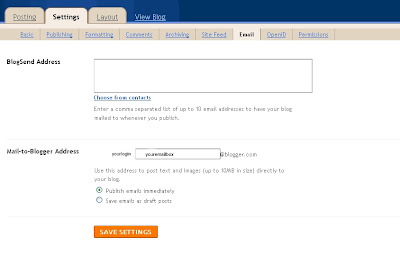 Blogger makes this incredibly easy and does most of the work for you.
Under Settings> Email
In the Mail to Blogger Address, choose an email address you would like to use.
You can also chose if you want to publish or keep them as drafts (for review and publication later).
Now to email a post to blogger from your email client:
In the To: type in the complete name of Mailto-Blogger-Address field. Format exactly as it appears, with the periods and including both the login name, what you typed in the box and the blogger.com, e.g., if your login is mrsmithy, and you used blogme in the box, then your would send an email to
mrsmity.blogme@blogger.com
In the subject of your email, type the title of your soon to be published blog post.
In the body of your email type the post. If you use an email program with html capabilities (links, etc.) blogger should be able to post those correctly.
Make sure to remove any signatures, if you do not want to include those in your posts.
Click send.
Voila! Done!
POSTING TO WORDPRESS VIA EMAIL
To post by email to wordpress, you first need an email mailbox for wordpress. If you use your regular email box, everything sent to your mailbox will be posted to your blog -- oops!
>Create a new email just for wordpress
..and then follow these instructions from wp. It is not quite as easy as blogger, but still doable.
POSTING TO BLOGGER VIA EMAIL
 Blogger makes this incredibly easy and does most of the work for you.
Under Settings> Email
In the Mail to Blogger Address, choose an email address you would like to use.
You can also chose if you want to publish or keep them as drafts (for review and publication later).
Now to email a post to blogger from your email client:
In the To: type in the complete name of Mailto-Blogger-Address field. Format exactly as it appears, with the periods and including both the login name, what you typed in the box and the blogger.com, e.g., if your login is mrsmithy, and you used blogme in the box, then your would send an email to
mrsmity.blogme@blogger.com
In the subject of your email, type the title of your soon to be published blog post.
In the body of your email type the post. If you use an email program with html capabilities (links, etc.) blogger should be able to post those correctly.
Make sure to remove any signatures, if you do not want to include those in your posts.
Click send.
Voila! Done!
POSTING TO WORDPRESS VIA EMAIL
To post by email to wordpress, you first need an email mailbox for wordpress. If you use your regular email box, everything sent to your mailbox will be posted to your blog -- oops!
>Create a new email just for wordpress
..and then follow these instructions from wp. It is not quite as easy as blogger, but still doable.
Monday, November 17, 2008
Dynamic Content Group's working list
The Dynamic Content Group (DYG) of which I am Chair, is mostly just a brainstorming group. We grew out of WAG (the Web Advisory Group) and our charge is to examine how we use Web2.0 technologies and see how we could use them more effectively. To that end, we are currently focusing mostly on "traditional" web2.0 technologies, and we haven't talked too much about some areas of the website: the catalog, specific website portals (Hargrett, DLG, etc.), our database projects (GALILEO@UGA, ETDs, etc.)
There is only so much time for this kind of thing, ya know. :-)
Anyhow here is our latest working/discussion list (which doesn't necessarily mean that we will do any of these):
- news & events (aka the blog) content expansion?
- reviews (film, book) think staff favorites, we recommend, etc.
- library lingo -- terms used in the library world both within the libraries/librarianship (stacks, discharged, etc.) and general terminology that is used by libraries (rss, podcasts, etc.)
- del.icio.us tagging (aka, we find these sites interesting) -- featured on the blog home page
- Continue to expand the del.icio.us tagging program
- How to participate session, recruitment
- Building interest/ cross pollination
- podcasts
- How can DYG help?
- PR?
- flickr
- youtube
- Creating a library channel, one stop shopping for:
- the blog
- podcasts
- all of our youtube content (ugalibs youtube group)
- our ugalibs flickr group
- del.icio.us
- meebo?
- new books list via rss (sigh, one day....)
- Looking towards the future:
- How will we fit all of these pieces on to the website? newletters? other pr opportunities?
- How to better highlight/publicize our unique resources via web 2.0 technologies?
- Get ALL staff involved (if interested)? del.icio.us, podcasts, ?
- Voyager search box in facebook -- it's doable but worth consideration?
- New books list via rss (definitely future thinking, post Voyager 7)
Sunday, September 7, 2008
The story behind Chrome (google's new thang)
Are you tired of chrome yet? Not even sure what chrome is?
Here is the story of chrome (google's new browser):
..to be honest, it looks an awful lot like firefox3.... but no support for RSS Feeds? Are you kidding? Lots of chatter about its TOS, too, but apparently some of that was old verbage and has now been modified, at least, that is the official story. Bottom line is > read the TOS. ;-)
The task manager does look cool, though.
More and some how-tos...
How to:
Here is the story of chrome (google's new browser):
..to be honest, it looks an awful lot like firefox3.... but no support for RSS Feeds? Are you kidding? Lots of chatter about its TOS, too, but apparently some of that was old verbage and has now been modified, at least, that is the official story. Bottom line is > read the TOS. ;-)
The task manager does look cool, though.
More and some how-tos...
How to:
Tuesday, July 29, 2008
cool non-flickr image stuff found along -- agony, aviary, photoshop express, mr. picassohead
Most of you know about flickr, the online service to host images and photos. Now that Yahoo owns it, it replaces Yahoo photos. If you used Yahoo photos (as I did) Yahoo just migrated your photos for you right on over to flickr. ;-) If you have a Yahoo account now, but never signed up for a flickr account, you now have a flickr account via your Yahoo login (I think Yahoo needs to promote that more). In addition to simple image (and now video!) hosting, there are all sorts of tools and add-ons to extend flickr. Cool enough, right?
Google came into the mix with picasa, a similar service to flickr. Picasa has a download component and one day, I will give it a try. I already have good image editing stuff (GIMP, Photoshop, Illustrator, CorelDraw, and a bunch of other stuff that came with my tablet that I never use!), plus, I kind of like Flickr, so Picasa has just never really interested me. If Picasa could somehow be EMBEDDED into blogger to make image editing easier there, well, then I would definitely use it!
Anyhow, there are lots of other choices out on the internet for image editing and hosting, besides flickr and picasa. One choice is the new Photoshop Express which now works with Flickr and Imagebucket. Photoshop Express, has some built in editing tools, galleries, and the ability to share images. My photoshop express gallery is here.
Aviary is a little different. Aviary is a collection of online tools from traditional image editing to video to music to 3d model rendering.
Of course, considering some of the competition (gimp, photoshop, corel's suite, finalcutpro for video), I will be interested to see how it all stacks up (psst... send me an invite to hummingbird and starling...) The image editor, phoenix, looks good for a completely online editor (will it be free after beta?) -- it feels like a real piece of image editing software. It comes with the all of the standards: image sizing, auto color correction, a few basic filters, layers, the ability to draw and add text. I've only started to play with it, but the first thing I noticed (considering my raw pix are 10.2m, is that resizing doesn't tell you what the dpi or ppi is -- just dimensions.
All in all, though I'm impressed and I can't wait to give all of the other tools a whirl. If a.viary stays free, I can definitely see this being my favorite solution for image and video editing. I often move from computer to computer (work, desktop, laptop) and none of them have the same graphics software. Being able to use something like a.viary would be a life saver.
agony, is just a fun little piece of a software which creates spiragraphic images. Fireworks can do this sort of think using tweening, but wow, is this fun. Agony has a whole flickr gallery of submitted works.
..and for fun creativity on 'net, can you really beat mr.picassohead?
Google came into the mix with picasa, a similar service to flickr. Picasa has a download component and one day, I will give it a try. I already have good image editing stuff (GIMP, Photoshop, Illustrator, CorelDraw, and a bunch of other stuff that came with my tablet that I never use!), plus, I kind of like Flickr, so Picasa has just never really interested me. If Picasa could somehow be EMBEDDED into blogger to make image editing easier there, well, then I would definitely use it!
Anyhow, there are lots of other choices out on the internet for image editing and hosting, besides flickr and picasa. One choice is the new Photoshop Express which now works with Flickr and Imagebucket. Photoshop Express, has some built in editing tools, galleries, and the ability to share images. My photoshop express gallery is here.
Aviary is a little different. Aviary is a collection of online tools from traditional image editing to video to music to 3d model rendering.
All of our tools are based right in your browser or as downloadable AIR applications. Our tools all communicate and relate to each other. To illustrate an example: You can import a swatch from Toucan into Phoenix, while doing complex bitmap processing of a 3D object developed in Hummingbird. Finally, you can take your finished artwork and lay it out in Owl as the DVD artwork for a music CD you and your friends put together in Roc and Myna and offer it for sale in our marketplace, Hawk.If those are half as good as they sound, I think I might have died and gone to heaven. ;-)
Of course, considering some of the competition (gimp, photoshop, corel's suite, finalcutpro for video), I will be interested to see how it all stacks up (psst... send me an invite to hummingbird and starling...) The image editor, phoenix, looks good for a completely online editor (will it be free after beta?) -- it feels like a real piece of image editing software. It comes with the all of the standards: image sizing, auto color correction, a few basic filters, layers, the ability to draw and add text. I've only started to play with it, but the first thing I noticed (considering my raw pix are 10.2m, is that resizing doesn't tell you what the dpi or ppi is -- just dimensions.
All in all, though I'm impressed and I can't wait to give all of the other tools a whirl. If a.viary stays free, I can definitely see this being my favorite solution for image and video editing. I often move from computer to computer (work, desktop, laptop) and none of them have the same graphics software. Being able to use something like a.viary would be a life saver.
agony, is just a fun little piece of a software which creates spiragraphic images. Fireworks can do this sort of think using tweening, but wow, is this fun. Agony has a whole flickr gallery of submitted works.
..and for fun creativity on 'net, can you really beat mr.picassohead?
Saturday, July 19, 2008
Tagging the Long Tail and the library catalog
Brief and interesting post @ RSS4Lib about projects to tag various library catalogs, and the relevance of lesser used tags. No mention of PennTags, but there is a brief mention of MTags from the University of Michigan.
I couldn't have said it better myself.
The real value of tagging is like that of a library: it's the collections, the constructed universe of things that someone (a librarian, a subject expert, a user) brought together. While my tags may prove of no value to anyone else in finding a particular item, the mass of items I've used that idiosyncratic tag on may very well guide a future user in resource discovery.
I couldn't have said it better myself.
Monday, July 14, 2008
Build the Open Shelves Classification
Build the Open Shelves Classification---from LibraryThing.
Description: I hereby invite you to join the Open Shelves Classification (OSC), a free, "humble," modern, open-source, crowd-sourced replacement for the Dewey Decimal System.
You can follow its progress or contribute to its effort here
Sunday, July 13, 2008
Flowchart -- new free online flowchart site and I have invites!

So, I volunteered to whip up a little flowchart of a project. It's fairly straightforward and the critical path is rather obvious. I also think I'm pretty good with flow charts. Not only have I been to lots of project management workshops and classes, but I spent way too much time in a previous position (information/document specialist & blueprint librarian) working with Visio. Somehow, not only the job of managing the organizational chart for a relatively huge division of a global company, but much of record keeping of their project management, had fallen to the IS at some point.
Unfortunately (or perhaps, fortunately!) I no longer have Visio to spit out those beautiful interconnected flowcharts and structured org charts. So, in the past, I've used Word, Excel, or some other product, when I've need to fake a flowchart. Today, in digging around on the net a little, I found a beta test of a new free online flowchart creator, flowchart.com (think you can remember that? LOL). It is not perfect (for one, entering colors by hexcode didn't seem to work, and the colors are very standard, otherwise) , but whoa! it works otherwise.
So, if you want to try this flowchart site, you can either add your name to the que for an invitation, or you can drop me an email, and I'll send you an invite. I only have 6 invites left.
Tuesday, July 8, 2008
Organize your inbox
Well, this only works with outlook email at the moment, but here is the claim:
I first read about this free software in june's issue of wired. . Sounds great, hmm? Basically, it helps you manage your inbox -- but only in outlook (at least at the moment).
...information will become much easier to find. When a new email arrives, the sender's full communication history appears in the Xobni sidebar, including past conversations, attachments and contact details. Xobni also includes a blazing fast email search tool..
I first read about this free software in june's issue of wired. . Sounds great, hmm? Basically, it helps you manage your inbox -- but only in outlook (at least at the moment).
Tuesday, July 1, 2008
wordpress vs. mt (movable type)
good overview of wordpress vs. movable type (mt):
http://mashable.com/2007/08/15/movable-type-wordpress/
http://mashable.com/2007/08/15/movable-type-wordpress/
Monday, June 30, 2008
VU Find - on authority control
Interesting article on authority control and VU Find includes a very good (and brief!) view of how authority control works, in general, plus detailed tweaking of VU Find to improve authority control.
http://journal.code4lib.org/articles/57
http://journal.code4lib.org/articles/57
Subscribe to:
Posts (Atom)