Find>

Loading...

Tuesday, May 31, 2011

Survey tools with support for multiusers

This is actually part of a software investigation I did for work. We're looking for a survey tool (preferably free) which has the ability to create accounts within a large account and some user management (survey creators can only see their own surveys unless they are shared)

I reached out to my network and here are their answers:
Survey Tools

...


Multiuser accounts


Other

KwikSurveys http://www.kwiksurveys.com/

Monday, May 30, 2011

Why would you put a QR code on a website?


This question came up after a discussion of QRcodes. Basically the person felt that there was NO reason to put a QRcode on a website - links should just be links. I agree that links that are just links are well... just links.. but that viewpoint completely overlooks the difference between mobile and nonmobile (laptop, desktop, etc.)

The advantage of a QRcode is that you can make it do something to phone or mobile device or heck, even a desktop PC - you can send content and information directly to someone without them having to copy and paste, or click or additional steps, or even login (because they will already be logged in via their mobile). So, I can think of few reasons- most notably as a means to download an app to your phone but I can think of a few other uses, too, so here goes:

Uses for a QRcode on a website
  • To load an app
  • Take this blog (or news or RSS or whatever) with you
  • Maps & directions
  • Contact info and save to address book
  • Events - download event, set event reminder & save to calendar
  • Coupons or special offers
  • Menus
  • Photo slideshow or video
  • Podcasts/Videocasts
  • Music
  • Wallpapers/virtual postcards
I'm sure there are even COOLER things that can be done - those are just a few I can think of off of the top of my head.
Here is an excellent list of QRcode generators and for even more QR fun check out stickerscan.


or you can just attend my exhibit. ;-)

Friday, May 27, 2011

Who says twitter is irrelevant?

We all share and learn together - collective learning and knowledge on a big scale.
(My mention is May 23)

I also really like the idea of audiotweets - might have to give a try. I wonder if I could embed them into a blogger post though... thoughts?

on criticism and critique

On Sunday evenings I often attend a twitter chat called #blogchat. One regular topic is blog review. Bloggers will submit their blogs for review along with either questions for the group or insights into their vision/mission of their blogs.

As with all critiques (especially online ones), these can turn personal and even mean-spirited. However, given the nature of text based virtual communication and the brevity of twitter posts, I do think the potential for misunderstanding is even greater as sometimes the negativity is unintentional.

In conversation with a few members of the group, it did make me think about critique. What is true in art is true in all other critiques. Critique is not just about criticism - the goal of a good critique is to HELP the person being critiqued. It is not to demean them or discourage them. Unfortunately, many see critique as the chance to be a "critic" - a chance to slam someone and be very mean, under the umbrella of critique.

A good critique:
  • Gives the receiver of the critique insight into how people understand and interpret your work (think of it as UX - user experience - and usability)
  • provides thoughtful feedback - bad or good are irrelevant words in a critique
  • identifies problems and questions
  • suggests solutions and address questions or concerns from the person being critiqued
  • is not personal but focused on the work
  • provides the receiver of the critique a chance to address questions
  • is honest without being mean
  • focus on the positive BUT not avoid the negative
  • is subjective - everyone has a different opinion, life experience, and knowledge

Monday, May 23, 2011

Art exhibit & reception


Honestly, this is a great showing of work. Check it out if you have time. Reception June 15 6-8 p.m. Oconee County Library. Featuring work from robin fay (me), sarah hubbard & rene shoemaker. Companion exhibit and website will be here


dets in the code above. Just scan it with your mobile device.

Saturday, May 21, 2011

Today at a glance - various ramblings about nook, sandboxes, and tweeting

Meetings meetings meetings..
  • Discussion and ideas for wordpress for the libs blog (already use it; looking to expand it). I'm working on my own domain at the moment. I'm so glad that I have my own webspace, it makes design, templating and well... experimenting much easier. Unfortunately, we don't really have much in the way of a sandbox ; it's just a subdomain of the overall website. So, things don't work like they should in real time, esp. with opensource software. Plus, loading files can sometimes be a real pain in the a$$, because site security is so strong (which is good/bad).
  • Rover/assistant for Amy's 10Weeks session on tweeting. I think I will just sit in the back of the class and tweet. LOL I forgot my netbook/tablet, so thank goodness for the QWERTY phone. Hmm... wonder if I can tweet via nook color?
  • Gadget group meeting afterwards - I'm supposed to talk about the nook color I've been playing with. Pros - it's beautiful and smaller than ipad (I like that - more portable); supports flash & some android apps (not all); Cons - need wifi to set it up (for real? I couldn't seem to do it just via the usb cable) and CREDIT CARD needed for even free stuff at Nook store. Finally, the nook niche space of the B&N site is a mess. If there is an image of an app, you should be able to click on it and go to the page within the app store.... but noooo.... lots of PR-y shiny, not lots of functionality. Bad UX B&N!)

Monday, May 16, 2011

Japanese libraries & ALA Library relief effort

The massive 9.0-magnitude earthquake on March 11, 2011 triggered a tsunami that struck the east coast, devastating much of the Tohoku area in Japan. Fifteen thousand people are confirmed dead with more than nine thousand still missing.

Libraries in the region were also devastated in the region. The Minami-Sanriku Town Library disappeared without a trace. The chief librarian was killed. Rikuzen-Takata City suffered catastrophic damage from the tsunami. Most of the city area is covered with piles of rubble. All library staff members were killed or are still missing. The framework of library building remains, but nothing is left inside. 70 out of 355 public libraries in five prefectures are closed. Others are now serving as shelters for those who have lost their homes.

The American Library Association has set up this site to help take in donations from the United States for Japan Library Association, who is leading the effort to help provide services and support. Please consider making a donation to help rebuild libraries in Japan http://www.ala.org/japan

--- from http://www.ala.org/japan

Tuesday, May 10, 2011

If you post to Twitter, does twitter own your photos and artwork?


A few of us at twitter (thanks @ashuping) were having a discussion about images & creative commons which expanded to microblogging. A few months ago I read a really interesting post arguing that if you post an image through twitter it is essentially public and free to be used by anybody (or at least that is how I read the article). Now, I'm not a lawyer, nor do I play one on TV. However, I am artist and I do share my work on social media sites. Generally, I use Picnik to push through to facebook and to twitter and even to picasa!

I used to use Flickr alot and I've been thinking about going back to Flickr because it does support metadata, cc licensing, and a host of other features...but it bothers that I was paying for a PRO account, but I couldn't use it commercially. Just seems ridiculous. Anyhow, I digress.


I think Twitter's TOS on the surface sound scary, but it seems to me that linked/embedded images (such as those pushed through via flickr, youtube, etc.) would retain their original copyright/licensing at their "home" sites - after all, we all share all sorts of things via sharing links and hotlinking; hotlinking involves borrowing (or stealing depending on the viewpoint of the hosting site) bandwidth, but the image is still on its home site where it is protected via license/copyright (if the home site supports that). It seems that is the argument that Eric Reagan, a lawyer is taking (his post really describes the whole situation). As Eric points out, there is always human interpretation, though.

So what is an artist to do? My suggestion is to use a site where you can control licensing, watermark and use the lowest resolution you can. We already have to compress our photos greatly, so photos on the web are never truly the original creation. As for sites where you can't assign licensing or copyright, you have to make the decision as to whether you want to do use them and how. Maybe watermarking suffices; maybe not - read the TOS. Since a majority of my work is 2D mixed media, a photograph is never going to truly approximate the actual image; for photographs it is a little more tricky.

Monday, May 9, 2011

What are core competencies in LIS?

Valdosta State University is surveying to find out what the core competencies of Library & Information Science. Here's your chance to provide your thoughts and who knows, you might even help impact the curriculum, too.
https://www.surveymonkey.com/s/VSUcorecomp

Friday, May 6, 2011

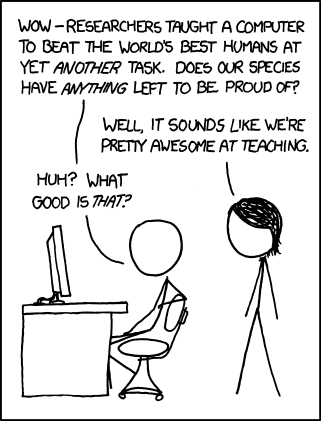
So, what are humans good at? Teaching? [humor]

Oh, I love xkcd. 

http://xkcd.com/894/

My QR code


Ok, I"m trying a new one.
Not that anyone cares, but here is my QRcode.

Tuesday, May 3, 2011

What happens if we don't invest in staff & they stay?


A twitter post (@sabram @eranium) a few weeks ago posited this question:
CFO asks CEO "What happens if we invest in developing our people & then they leave us?" CEO: 'What happens if we don't, and they stay?"

Interesting thought, isn't it? For many of us, we have staff who work for us, take advantage of training (either that we offer as on the job training) or via formal coursework (such as completing a degree or certificate program) and then LEAVE. To some, it would seem that they suck us dry of what we can offer and then move on. We've advanced their career, perhaps, uptrained them so they can do more,  and then they take that knowledge right out the door. I'm sure there are managers who think exactly that way.     
...but there is more to the story. If we've worked hard to develop our staff, do we really expect them to stay with no added reward? I realize that not all staff are motivated by an increase in salary (flexible schedules, telecommuting, health care, vacation time can be very powerful motivators) but do we really expect people to stay and work harder (or at more indepth level) for us out of what? LOYALTY? a sense of ALTRUISM? Seriously?!?! Given how low salaries are in libraries, I am never surprised when someone leaves.

Instead, I get kind of sick to my stomach when I hear of someone who has been in EXACTLY the same position for 15, 20 or even (egads!) 30+ years. I only hope that their job has been interesting enough and their motivational factors have been met... otherwise, that is a long time to be miserable and "checked out". I do know for some, they truly love what they do, and they have had enough variety, opportunities, and rewards to continue to motivate them. 


Then there is the second part of the question:  What if we don't invest in staff,  then what? In some ways, it is the same as the answer above. The motivated staff will be motivated - motivated to look for other opportunities. Other staff will stay - at worst stagnating, at best, coasting along still doing a good job (that they could probably do with their eyes closed because they have become an EXPERT EXPERT at their job). In Grad School, one professor (that I kind of hated because he made inane jokes about tech services people in libraries, but he did have a good point or two) used to tell my class regularly: You Grow, or You Die.

I think that gets to the heart of this question. We either help staff grow or we help kill them psychologically - we let them stagnate and we turn good employees into staff who are disengaged, bored, and disenchanted.


Growing staff is much like growing a garden: it takes a little effort: the right seeds and soil (right person for the right job), some fertilizer (training, mentoring, and encouraging), letting them grow (getting out of their way so that can do the job you hired them for) and occasional weeding and cultivating (getting rid of what doesn't work & encouraging what does). 

[thanks so much to Stephen, the VP Strategic Partnerships and Markets for Gale Cengage (and all around library geek) & Stefan Erschwendner is Managing Partner of @LHBS_AT for this blog topic. You can follow both of them on twitter @sabram @eranium}

Monday, May 2, 2011

Converting Ebook formats to make them compatible with your reader

So, I'm playing with a Nook Color (oh, the hardship) and trying to compare it to my Kindle and my tablet. One thing I've discovered is that ebook file formats for free stuff are in every format imaginable. Some Kindle compatible, some Windows (my tablet), some Nook (Android/Nook). If you want to see the specs for the two as well as which file formats are supported, check out my File Formats (and features comparison): Kindle vs. Nook matrix.

So, I stumbled across a few tools & resources for converting file formats for ebooks, especially for Kindle, since it does not natively support either .lit or .epub formats:
As to what  to use to convert files to mobi (for Kindle) the most common answer seems to MobiPocket. While there are TONS of products out there to create a PDF from a file (even the free PDFCreator can be used to create (print) a PDF from a file  -- if you can open it in the original format, of course), anyone who has ever read a book in PDF format knows what a pain that can be. MobiPocket also looks cool in that it has a tool to create ebooks. Kindle supports other formats of ebooks, but mobi seems like it is probably the easiest to work with.


I haven't tried borrowing a Kindle book from my library yet but but Lendle, a personal lending site, seems still be active, in spite of earlier problems with Amazon.

Sunday, May 1, 2011

Tracking your profile and who unfriends you on Facebook - mostly scams

Stalker Tracker and Profile Tracker (Facebook apps? apps might be too generous) are just scammy products; there is not any app that can show you who has viewed your profile. Facebook probably knows, but you don't. Pages can see how many views and other basic website statistics; individual personal accounts currently display no statistical information (at this point - although it is bound to be collected by FB).

Facebook's statement on profile tracking:
http://www.facebook.com/help/?faq=14357
Facebook does not provide applications or groups with the technical means to allow people to track profile views or see statistics on how often a particular piece of content has been viewed and by whom. If an application claims to provide this functionality, please report the application by going to the application’s About page and clicking "Report Application" at the bottom of the page, or by clicking "Report" at the bottom of any canvas page within the application.

Facebook' statement on unfriending: "Stories will never be published about: ...People you remove from your friends."

About the only way to see who unfriends you is to install Greasemonkey (a Firefox addon) and use a third party (javascript) that tracks who unfriends you, considering that it is not retrospective, it probably just keeps track of your friends starting from the time you install it. It is also Firefox specific, too. You can find info about that here


You can read more about the scam app for profile tracking here 

To get rid of these from a facebook account:
Account>Privacy settings>Apps and websites>
You can view the list of apps you have authorized (Click edit)

Also two choices are featured up front:
Remove unwanted spammy apps
OR in a worst case scenario you can turn off all platform apps, but then you'll need to reauthorize the ones you want use.

You can also search for specific apps: 
Click edit to see what they have access to and make changes as appropriate.