Hanging some artwork at a gallery in the ATL.
Yes, I do re-hang the same painting about 50 times. It weighs about 50lbs (embedded shells & mixed media) and the nails would not hold it up.
Wednesday, October 28, 2009


Tuesday, October 27, 2009
Question of the day: download video from facebook
There are a few different ways to download a video from facebook, none of which are built in to facebook. You can dig around in the internet cache for (IE) or Firefox or if you use Firefox you can add this wonderful little GreaseMonkey script that creates a download link right at the video in facebook. Whoa, now that is cool.
Monday, October 26, 2009
For you bloggers -- National Blog Posting Month
Nablopomo runs several blog events to encourage bloggers, too.... well, blog. October's theme was haunted. November is blog every day. I'm going to give it a try this year.
As you know, November is just around the corner and with it comes the big blogging free-for-all of the "official" National Blog Posting Month. There's no theme for November, so you're free to make it into whatever you want it to be!
There's a new system for submitting your link to the blogroll. If you go to the Blogrolls tab you'll see a sub-tab right below it that says "Submit Link." Click on that, follow the directions, and if all goes well you'll see your link show up on the blogroll within a couple of hours, rather than days. It's a new system and I fully expect to spend the week ironing the kinks out of it, but feel free to give it a try and let me know what you think.
http://www.nablopomo.com/blogrolls
The Randomizer is back just in time for November! It draws pages from the blogroll, so be sure to sign up for monthly blogging if you want your blog to be seen on the Randomizer.
http://www.nablopomo.com/page/randomizer-1
November HTML badges are up, too:
http://www.nablopomo.com/htmlbadges/november-2009-html-badges
If you've made a badge of your own, be sure to link to it in the comments.
And lastly, prize guidelines have been posted, too. They're a sub-tab under the Prizes tab:
http://www.nablopomo.com/prizes
We're starting to get a few donations already, and I'll continue to accept prize queries until the end of November, so there's no rush.
That's all for now. You'll probably be hearing from me a few times during November, mostly just with prize updates and motivational messages that will no doubt inspire you to keep posting every day. Best of luck, everyone!
Eden
http://www.nablopomo.com/profile/toasteroven
Visit NaBloPoMo at: http://www.nablopomo.com
As you know, November is just around the corner and with it comes the big blogging free-for-all of the "official" National Blog Posting Month. There's no theme for November, so you're free to make it into whatever you want it to be!
There's a new system for submitting your link to the blogroll. If you go to the Blogrolls tab you'll see a sub-tab right below it that says "Submit Link." Click on that, follow the directions, and if all goes well you'll see your link show up on the blogroll within a couple of hours, rather than days. It's a new system and I fully expect to spend the week ironing the kinks out of it, but feel free to give it a try and let me know what you think.
http://www.nablopomo.com/
The Randomizer is back just in time for November! It draws pages from the blogroll, so be sure to sign up for monthly blogging if you want your blog to be seen on the Randomizer.
http://www.nablopomo.com/page/
November HTML badges are up, too:
http://www.nablopomo.com/
If you've made a badge of your own, be sure to link to it in the comments.
And lastly, prize guidelines have been posted, too. They're a sub-tab under the Prizes tab:
http://www.nablopomo.com/
We're starting to get a few donations already, and I'll continue to accept prize queries until the end of November, so there's no rush.
That's all for now. You'll probably be hearing from me a few times during November, mostly just with prize updates and motivational messages that will no doubt inspire you to keep posting every day. Best of luck, everyone!
Eden
http://www.nablopomo.com/
Visit NaBloPoMo at: http://www.nablopomo.com
Sunday, October 25, 2009
Fix facebook feed -- facebook "enhancements"
So, if you logged in to facebook over the weekend you saw that FB has wreaked havoc on your feed, greatly impacting the information you send out to your friends and what you see from your friends. Friend spam! I love it (not really.....) Of course, along with the bad is some good options. Potentially LOTS more control over what you share (or do not share).
Unless you update your FB settings, when you friend a person (or are tagged in a photo or a host of other activities) , all of your friends (unless they have hidden you -- and what's the real point of that?) now see a note about the activity in their feed. FB has also changed the feed to include more info from friends, but it is limited to a random (at least, I've read it is random) 250 friends. If you have less than 250 friends, you should see everybody.
This enhancement caught a lot of people by surprise including me (I was presenting and demoing Facebook and it was changing as I was showing it!) The feed can be edited to include everybody (there should be an 'edit feed' link on the lower right of the home page, but I haven't had any luck getting it to display).
The other settings can be edited under
Settings>Privacy Settings>News Feed and Wall


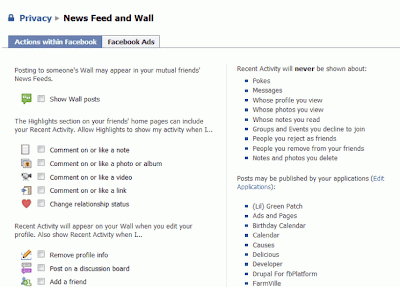
Regarding changing the feed to include more than 250 -- perhaps, because I do not have more than 250 friends, I will not see this option until I reach that treshold. I really don't know, I tried the "fix" and it didn't work for me, but does for others. The important part seems to be clear your cache, and privacy out of your internet browser.
Here is a video demonstrating what to do to fix the 250 treshold
Here is a great NYT article about what facebook is doing!
...and here is my presentation about facebook privacy (which I did last week before these changes hit). In a nutshell> check your privacy settings. What YOU POST (BROADCAST) is not what you SEE (news feed).
Unless you update your FB settings, when you friend a person (or are tagged in a photo or a host of other activities) , all of your friends (unless they have hidden you -- and what's the real point of that?) now see a note about the activity in their feed. FB has also changed the feed to include more info from friends, but it is limited to a random (at least, I've read it is random) 250 friends. If you have less than 250 friends, you should see everybody.
This enhancement caught a lot of people by surprise including me (I was presenting and demoing Facebook and it was changing as I was showing it!) The feed can be edited to include everybody (there should be an 'edit feed' link on the lower right of the home page, but I haven't had any luck getting it to display).
The other settings can be edited under
Settings>Privacy Settings>News Feed and Wall


Regarding changing the feed to include more than 250 -- perhaps, because I do not have more than 250 friends, I will not see this option until I reach that treshold. I really don't know, I tried the "fix" and it didn't work for me, but does for others. The important part seems to be clear your cache, and privacy out of your internet browser.
Here is a video demonstrating what to do to fix the 250 treshold
Here is a great NYT article about what facebook is doing!
...and here is my presentation about facebook privacy (which I did last week before these changes hit). In a nutshell> check your privacy settings. What YOU POST (BROADCAST) is not what you SEE (news feed).
Friday, October 23, 2009
Thursday, October 22, 2009
Facebook, privacy & digital identity (presentation)
10/26/2009 Update: Although my presentation is still (very) relevant, if you are looking for the fix for the latest facebook live feed enhancement, start here. This presentation was done the week before the enhancement was launched so although I did talk about privacy issues (and setting your privacy settings) the feed enhancement is was not available at the time.
...and you can read all my posts about facebook here and all of my posts about digital identity here.
Prepping for presentation on facebook & privacy
Oh, I think I may use this to wrap up my presentation on facebook. So funny (warning pg-13)
Wednesday, October 21, 2009
Semantic web, social web, and the progression of the web (presentation)
Well, this is a pretty unwieldly subject to pack into a 1 hour presentation (and I didn't go very far into the details of the mechanics of the semantic web, at all)....
Tuesday, October 20, 2009
Question of the day: My "hand" tool is stuck in Fireworks, Photoshop, etc.?
So, I had the dreaded stuck "hand" tool in MXFireworks 2004 (yeah, I know, way behind, I work for the govt....) where I absolutely could do nothing except move around using the hand tool.
After much googling, here are the responses I came up with (and I now share in hopes of helping somebody else) :
The first three are duhs, which didn't work for me ;-)
Turn off conflicting software/clear memory
After much googling, here are the responses I came up with (and I now share in hopes of helping somebody else) :
The first three are duhs, which didn't work for me ;-)
Turn off conflicting software/clear memory
- Restart the software (Fireworks, Photoshop, etc.).
- Restart your computer
- Turn off any Macro products you might be running
- Edit>Preferences>Reset all warning dialogs (Photoshop)
- Edit>Preferences (Fireworks; save -- I didn't reset my preferences, just re-saved the existing ones and it worked)
- Commands>Reset Warning Dialogs (Fireworks)
Monday, October 19, 2009
Bookmark in del.icio.us, send to twitter and, post to facebook
There are probably multiple ways to do this (friendfeed, google reader, etc.) but I'm already posting from twitter to facebook. So, throwing in another tool that I use (and love -- but really only as a personal bookmark service) del.icio.us, I discovered that I can now bookmark in del.icio.us and then send to twitter. Using the post from twitter, I can then send it right on over to facebook (using one of the twitter to facebook apps). If you need to setup a twitter to facebook app, may I suggest selective twitter, as explained here ?
If you only want to post bookmarks in twitter from delicious, you of course, can just ignore all of the facebook references. ;-)
Once you have you twitter feeding into facebook, the next step is whoa, easy!
Login to delicious. Tag/Bookmark.
You'll see a new field labelled SEND. This field actually allows you to email it, too.

Click on the Send field to link your del.icio.us and twitter accounts together.
Note, you can tweet ALL nonprivate bookmarks automatically; however to use selective tweet to facebook, you will need to add the #fb to send it onward. So, auto-send to twitter works, but unless you tweet everything from twitter to fb, it wouldn't automatically push over to facebook. Does that make sense?
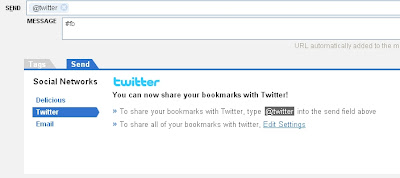 It is hard to see in these screencaptures (thanks blogger), but the important thing is to add @twitter in the Send field. Once you do that and hit enter, the message box will drop down. In the message box, write your tweet blurb. If you use selective twitter for facebook, add #fb to the end of your blurb. Do not include the link URL in the message; Del.icio.us will automatically truncate the URL and post it to twitter.
If you only want to post bookmarks in twitter from delicious, you of course, can just ignore all of the facebook references. ;-)
Once you have you twitter feeding into facebook, the next step is whoa, easy!
Login to delicious. Tag/Bookmark.
You'll see a new field labelled SEND. This field actually allows you to email it, too.
Click on the Send field to link your del.icio.us and twitter accounts together.
Note, you can tweet ALL nonprivate bookmarks automatically; however to use selective tweet to facebook, you will need to add the #fb to send it onward. So, auto-send to twitter works, but unless you tweet everything from twitter to fb, it wouldn't automatically push over to facebook. Does that make sense?
 It is hard to see in these screencaptures (thanks blogger), but the important thing is to add @twitter in the Send field. Once you do that and hit enter, the message box will drop down. In the message box, write your tweet blurb. If you use selective twitter for facebook, add #fb to the end of your blurb. Do not include the link URL in the message; Del.icio.us will automatically truncate the URL and post it to twitter.
Thursday, October 15, 2009
backup for twitter
Interesting idea -- an online backup service (mostly pay-to-play) but twitter backup is free.
http://backupify.com/
http://backupify.com/
Monday, October 12, 2009
COMO presentations
Visit/join the official COMO Ning network. You can view resources shared by COMO presenters and participants; in addition, join in or start your own conversation about a conference session. Ning members may also post events such as meetups for specific groups of librarians or meetings that may be taking place during the conference.
Thursday, October 8, 2009
Cataloging tools (research in progress)
So, here is one thing I'm working on -- an article on cataloging tools. I'm not posting all of the research (needless to say) but you can see Beth Thornton & my presentation on our preliminary findings, here.
Saturday, October 3, 2009
Orphan Works (unclear copyright)
http://www.archivists.org/standards/OWBP-V4.pdf
From the introduction:
"'Orphan works' is a term used to describe the situation in which the owner of a copyrighted work cannot be identified and located by someone who wishes to make use of the work in a manner that requires permission of the copyright owner. Proposed orphan works legislation, such as the Orphan Works Act of 2008 (H.R. 5889) and the Shawn Bentley Orphan Works Act of 2008 (S.2913), would reduce penalties for infringement if an infringer 'undertakes a diligent effort to locate the owner of the infringed copyright.' This statement describes what professional archivists consider to be best practices regarding reasonable efforts to identify and locate rights holders. It is based on the authors’ knowledge of the kinds of materials that are likely to qualify as orphan works and on their professional experience in trying to obtain rights information for such works in the past."
From the introduction:
"'Orphan works' is a term used to describe the situation in which the owner of a copyrighted work cannot be identified and located by someone who wishes to make use of the work in a manner that requires permission of the copyright owner. Proposed orphan works legislation, such as the Orphan Works Act of 2008 (H.R. 5889) and the Shawn Bentley Orphan Works Act of 2008 (S.2913), would reduce penalties for infringement if an infringer 'undertakes a diligent effort to locate the owner of the infringed copyright.' This statement describes what professional archivists consider to be best practices regarding reasonable efforts to identify and locate rights holders. It is based on the authors’ knowledge of the kinds of materials that are likely to qualify as orphan works and on their professional experience in trying to obtain rights information for such works in the past."
Thursday, October 1, 2009
Ebook readers of the future?
I like the idea of ebooks and ereaders (I do, I really do) but...
I want full color, lcd which automatically adjusts to ambient light, readable font (higher dpi to mimic the typeface on paper) , support for all digital media formats, and crossplatform formats for ebooks. Oh, and it should be lightweight, waterproof, dustproof, and freezeproof.
this is a start...
http://www.youtube.com/watch?v=_vBb3_aZN7g
I want full color, lcd which automatically adjusts to ambient light, readable font (higher dpi to mimic the typeface on paper) , support for all digital media formats, and crossplatform formats for ebooks. Oh, and it should be lightweight, waterproof, dustproof, and freezeproof.
this is a start...
http://www.youtube.com/watch?v=_vBb3_aZN7g
Mappos -- mapping real time order info from zappos
Another example of what a mashup can be in this case a map depicting the location and shoe style ordered from the online shoe store, zappos...
http://www.zappos.com/map/
http://www.zappos.com/map/
Subscribe to:
Posts (Atom)