So, I had to put together a matrix for ebook shopping for the Gadget Group in the Libraries. I tried to do a straightforward comparison, but as with all technology, that's not always easy. I love my Kindle, but Nook Color looks like it might be a great ereader/tablet platform (Android based) for under 300$. It certainly is lighter than my netbook/tablet hybrid (Dell Duo Tablet). I am disappointed that it doesn't seem to support Flash (at least without some hacking). I know that HTML5 will become the standard, but it is going to take a while to replace or convert all of the existing flash content, esp. movie clips. Oh well, at least my Dell Duo does all of that + ;-)
You can get the google doc here
Wednesday, March 30, 2011


Sunday, March 27, 2011
Thursday, March 24, 2011
Making the most out of meetings
I have been to alot of meetings over the years - some great, some not so great, some pointless, some redundant, some effective... Over the years I have gathered together my tactics for both being a participant and being the organizer.
Meeting organizers
A meeting organizer doesn't even have to be the person in charge of the actual meeting.
Organization:
Often these roles are split out, with the time keeper actually just being charged with keeping up with time, freeing the meeting leader to focus on discusssion and keeping the meeting on track.
Often we are asked to be on a committee or group with a leader/chair/meeting organizer, who has little experience with meetings. If the group is volunteer based, you may choose to leave it rather than suffer through endless ineffectual meetings; if it's assigned or mandatory, you will have to make the best of it -- but you can do things to help.
Meeting organizers
A meeting organizer doesn't even have to be the person in charge of the actual meeting.
Organization:
- Agendas. The agenda is the map for the meeting. If it's a collaborative group (committee, project group, etc.) the core agenda should be agreed upon my everyone ahead of time. Of course, things ideas will come up during the meeting, but there should be a basic agenda. The agenda should also be distributed to all participants ahead of time, so that they can do any preparation needed. Don't meet if there is no agenda. If there is no reason to meet (and a milestone celebration or project update CAN be a reason to meet), the meeting shouldn't be scheduled. Agendas should include items like todo/action lists, discussion topics, as well as updates from previous meetings - these can be in the form of progress reports.
- Frequency: weekly, monthly, as needed? Projects work best when there is a regular meeting cycle with scheduled targets/deadlines (what happens when targets aren't met really depends upon the nature of the group)
- Note taker to capture ideas. Cameras can also be helpful in capturing layouts and visual ideas.
Often these roles are split out, with the time keeper actually just being charged with keeping up with time, freeing the meeting leader to focus on discusssion and keeping the meeting on track.
- Make efficient use of time. Evaluate uses of technology. What can be done via email, phone, IM? Distribute materials(links, articles, research, etc.) ahead of time so that members have a chance to do preparation. F2f (Face to Face) time is precious and important; don't misuse it.
- Tangents and meeting control: Meetings can quickly get out of hand with idle chitchat or tangents. Some ideas may need to be tabled for further discussion or ideas, or assigned as meeting followup work.
- Listen. Build in some time in the agenda for discussion or questions.
- Group dynamics: Unfortunately, not everyone may be on the same page or one person may monopolize a meeting; the leader has to keep the agenda moving as well as deal with all of the elements of group dynamics. While it is a challenge, keeping control of a meeting is important.
- Role of members: Members should know what is clearly expected of them. For project groups and committees, assign action items to members and record that in the notes. If a member is not able to do their role (e.g., never come to a meeting prepared), the meeting coordinator needs to address it. For communication briefs and meetings, letting participants know when (and how) questions will addressed is important.
Often we are asked to be on a committee or group with a leader/chair/meeting organizer, who has little experience with meetings. If the group is volunteer based, you may choose to leave it rather than suffer through endless ineffectual meetings; if it's assigned or mandatory, you will have to make the best of it -- but you can do things to help.
- Ask for an agenda. Ask questions about the agenda (e.g., who is doing what item? what is the target deadline?)
- Ask about meeting schedule. If there is no agenda and nothing to discuss (which is impossible if previous meetings have been successful), it is ok to suggest rescheduling.
- Take notes. Ask about note taking if no one is assigned (or volunteers) for the role.
- Understand your role and do your part. What are you expected to do? Do it.
- Be respectful. Always treat your colleagues with respect even if they are being disrespectful to you (and if they are being disrespectful, you can say that, but really the meeting leader should step in before it gets that far!)
- ...do not allow others to waste your time. If the group seems off on a tangent, ask how it relates to the matter at hand. You may be surprised that it is related. Suggest that it be added to a upcoming agenda, if the meeting leader doesn't.
- Remember you are not the meeting leader. While you can do things to facilitate a better meeting, the meeting leader sets the tone and structure for the meeting. Unfortunately, you may have to suffer through meetings, if the meeting leader is ineffective.
Monday, March 21, 2011
call for presenters
Georgia library employees:
Do you have a great program, service, or idea that you'd like to share with your colleagues in webinar form? Then please consider acting as a speaker for the Carterette Series Webinars. No previous webinar delivery experience is necessary--we will provide training and assistance. Since June of 2010, over 1200 librarians from Georgia and around the world have attended live sessions of the Carterette Series Webinars (formerly the Wednesday Webinars). Two 60-minute webinars are offered on the third Wednesday of every other month. No formal proposal is required. Just submit a brief summary of your idea to Sarah Steiner at ssteiner@gsu.edu for consideration by the planning board. We will accept ideas on an ongoing basis, but spots are limited.
Do you have a great program, service, or idea that you'd like to share with your colleagues in webinar form? Then please consider acting as a speaker for the Carterette Series Webinars. No previous webinar delivery experience is necessary--we will provide training and assistance. Since June of 2010, over 1200 librarians from Georgia and around the world have attended live sessions of the Carterette Series Webinars (formerly the Wednesday Webinars). Two 60-minute webinars are offered on the third Wednesday of every other month. No formal proposal is required. Just submit a brief summary of your idea to Sarah Steiner at ssteiner@gsu.edu for consideration by the planning board. We will accept ideas on an ongoing basis, but spots are limited.
Saturday, March 19, 2011
A tale of 2 identities and the struggles to merge them:
I need some feedback. I have multiple blogs out there. Some are more up to date than others; but none are particularly scandalous.
From 2000-2006, I art blogged. I blogged my art process. I blogged new art works. I blogged my heath problems. I blogged a photo friday EVERY friday. I photoblogged from my camera. It was much more personal than what I post here. (there are about 1000 posts in an expression engine website, just sitting...)
I occasionally crossposted here, but not so much. It was back in my "I need to keep my identities separate" days. I didn't start out my professional career believing that my art was separate from my technology work. But I listened to people I valued (who I later found out didn't really have my best interests at heart) and worked very hard to keep those parts of my life compartmentalized - even to the point of supporting separate blogs. Of course, if someone was looking they would find the separate parts (but as I discovered being anonymous and artist, well those things don't work together so well!)
In the last couple of years, I decided that was all too much work and began to merge my identities back together .... but the reality is, I WILL be in the job market again, be it after I finish my PhD or some time before. Of course, I want to craft the best online presence I can. I've been accused of being "too much" and "too many" things. I think somehow people think I can not "be all of those things" successfully... but the reality is I work hard (heh, I've blogged 2 x this Saturday and I have a list of work projects for the evening). Rarely do I have a weekend (or vacation) when I'm not doing something. So what to do with all of those blog posts? My book reviews, my writings in an art journal, my instructional technology coursework?
What do you think? Should I fold everything in here? I named this journal content divergent, for the very reason that I wanted the freedom to write about what I want to. In all honesty, it would still be tech and library heavy, as my artwork takes time to do...
I'd love your thoughts on this.
From 2000-2006, I art blogged. I blogged my art process. I blogged new art works. I blogged my heath problems. I blogged a photo friday EVERY friday. I photoblogged from my camera. It was much more personal than what I post here. (there are about 1000 posts in an expression engine website, just sitting...)
I occasionally crossposted here, but not so much. It was back in my "I need to keep my identities separate" days. I didn't start out my professional career believing that my art was separate from my technology work. But I listened to people I valued (who I later found out didn't really have my best interests at heart) and worked very hard to keep those parts of my life compartmentalized - even to the point of supporting separate blogs. Of course, if someone was looking they would find the separate parts (but as I discovered being anonymous and artist, well those things don't work together so well!)
In the last couple of years, I decided that was all too much work and began to merge my identities back together .... but the reality is, I WILL be in the job market again, be it after I finish my PhD or some time before. Of course, I want to craft the best online presence I can. I've been accused of being "too much" and "too many" things. I think somehow people think I can not "be all of those things" successfully... but the reality is I work hard (heh, I've blogged 2 x this Saturday and I have a list of work projects for the evening). Rarely do I have a weekend (or vacation) when I'm not doing something. So what to do with all of those blog posts? My book reviews, my writings in an art journal, my instructional technology coursework?
What do you think? Should I fold everything in here? I named this journal content divergent, for the very reason that I wanted the freedom to write about what I want to. In all honesty, it would still be tech and library heavy, as my artwork takes time to do...
I'd love your thoughts on this.
MARC Madness (the game)
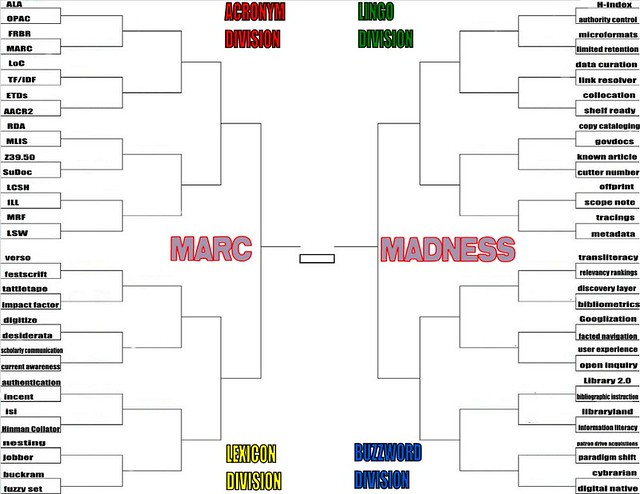
Andy Woodworth is doing a MARC Madness of library terms. It's all in silly good fun and I encourage you to stop by his blog and participate. Who says librarians don't have a sense of humor?
Friday, March 18, 2011
Lots of free webinars: cloud computing, Advocacy for your library; Interview skills & more
Creating Advocacy for Your Library
March 24
“Why do school libraries need money for books when everything is online?”
“Why do we need a campus library when students can do their research on the internet”
“You just check books in and out all day – why do we need a library?”
Register here
Stretching Your Cloud Budget: 5 Ways Government Agencies Are Doing More With Less
March 23
Register & info here
Weds Webinars: opensource, social media, digital identity, branding, libraries & more
Lots of topics (archived too!)
Register and view archives here
Ace the interview
March 24
“Why do school libraries need money for books when everything is online?”
“Why do we need a campus library when students can do their research on the internet”
“You just check books in and out all day – why do we need a library?”
Register here
Stretching Your Cloud Budget: 5 Ways Government Agencies Are Doing More With Less
March 23
Register & info here
Weds Webinars: opensource, social media, digital identity, branding, libraries & more
Lots of topics (archived too!)
Register and view archives here
Ace the interview
Ace that Interview: Expert Advice from Public Librarians
Date: March 22, 2011 - 6:30 to 7:45pm
Location: Richland County Public Library, Bostick Auditorium, 1431 Assembly St., Columbia, SC 29201
Sponsors: Public Library Section of the South Carolina Library Association and USC's Library and Information Science Student Association
Registration: Free but required. RSVP to Georgia Coleman at gcoleman@myrcpl.com.
Attend Online: http://breeze.sc.edu/acethatinterviewwebinar/
Thursday, March 17, 2011
Social Media Policy & Best Practices
My social media policy:
Use appropriate social media tools to professionally connect and cultivate a community of interesting individuals while sharing my experience, knowledge, and creativity. I will not friend/follow network everyone for the sake of numbers.
Best practices
1. Participate
2. Be respectful and appropriate - remember your audience
3. Share but don't overshare - if your mom or boss shouldn't see it, reconsider!
4. Build a community and be part of it.
5. Stay aware of privacy and TOS; be aware of what you can control and what you can’t. Make sure to read TOS and Privacy statements – they do sometimes change. Don’t be caught by surprise and don't violate the privacy of others.
6. Use preferences and settings wisely to control and manage your social network.
7. Do not spam, spy, cyberstalk, bully or engage in illegal activities online. If you are a victim of those behaviors, deal with them appropriately. Report inappropriate behavior.
8.Consider carefully who you friend. Be very careful about friending staff that you supervise, students, or children that you may know.
9. Use the appropriate tool. You do not have to use them all, or even connect with each person in every space.
10. Accept that your social network may not have the same political or religious beliefs as you, and they, are well, human.
…finally, if it’s on the web – it’s published. It may be private, but it is archived somewhere.
Use appropriate social media tools to professionally connect and cultivate a community of interesting individuals while sharing my experience, knowledge, and creativity. I will not friend/follow network everyone for the sake of numbers.
Best practices
1. Participate
2. Be respectful and appropriate - remember your audience
3. Share but don't overshare - if your mom or boss shouldn't see it, reconsider!
4. Build a community and be part of it.
5. Stay aware of privacy and TOS; be aware of what you can control and what you can’t. Make sure to read TOS and Privacy statements – they do sometimes change. Don’t be caught by surprise and don't violate the privacy of others.
6. Use preferences and settings wisely to control and manage your social network.
7. Do not spam, spy, cyberstalk, bully or engage in illegal activities online. If you are a victim of those behaviors, deal with them appropriately. Report inappropriate behavior.
8.Consider carefully who you friend. Be very careful about friending staff that you supervise, students, or children that you may know.
9. Use the appropriate tool. You do not have to use them all, or even connect with each person in every space.
10. Accept that your social network may not have the same political or religious beliefs as you, and they, are well, human.
…finally, if it’s on the web – it’s published. It may be private, but it is archived somewhere.
Wednesday, March 16, 2011
Branding and digital identity (webinar update & thoughts)
Interesting that the 3 big take-aways from my presentation on digital identity, networking & branding seem to be:
The entirety of the presentation is here:
- If you don't build your digital identity, someone else will. - I say this all of the time. Anyone who has heard me
preachteach/talk on identity, know that I firmly believe it. It's kind of a control your destiny kind of thing. Charlie Sheen seems to have learned that. ;-) - Facebook has created a false sense of community by calling the NETWORK "friends". Friends implies not only a relationship but a close relationship. If you decline a "friend" request, that implies a rejection of the relationship. As I worked on crafting my personal social media policy (which is based upon what is available here) one of my key elements has become that I do not accept all friend requests. My guidelines for who I follow or don't are here. The two of them sum up my social media policy and best practices.
- You do not need to connect with everyone everywhere and pick the best social media tool for you.
The entirety of the presentation is here:
Notes from March 15, 2011 - Giving Undergraduate Research a Worldwide Voice: Institutional Repositories as Publishers
Just some notes from the March 15, 2011 - Giving Undergraduate Research a Worldwide Voice: Institutional Repositories as Publishers conference. Yes, I do take notes on my netbook via google docs.
I will link to the slides if/when they are loaded on the web.
Undergraduate research
scholarship at claremont
cgu mfa exhibits (example of multimedia)
MIrA/LOOK Exhibit: New Visions for Architecture in Holyoke
Types of materials in repositories
Advantages of using a repository:
OCLC / ContentdM
sharing metadata
Content: db of architectural slides
providing global exposure
production of knowledge
Worldcat digital gateway Over 1 billion records
can upload to worldcat.org and map to marc
OhioLink Dspace project (groundlevel view)
DrC project
Cloud computing> extracting service from hardware
(D space) interested in a national consortium
Illinois Wesleyan (bpress)
I will link to the slides if/when they are loaded on the web.
Undergraduate research
- library as publisher
- scanning primary materials
- students write papers on primary materials; student papers are added to primary content (collection)
- library connecting scholarship to works - completing circle
- Community outreach
scholarship at claremont
cgu mfa exhibits (example of multimedia)
MIrA/LOOK Exhibit: New Visions for Architecture in Holyoke
Types of materials in repositories
- Capstone projects in addition to theses & dissertations
- works in repository can be part of CV
- ejournals - combining undergraduate research papers to produce a journal
- multimedia: combining research such as papers combined with GIS (Colby College)
- Being able to instantly publish once reviewed
- Workshops/Events Publishing/Conference papers
Advantages of using a repository:
- students can learn scholarly process
- visibility approves (library, university, research, everything)
- becomes part of CV
- student publications used for teaching & research
- shows success of students
- recruitment
- gives library stamp of quality (trust)
- branding
- enhances discoverability /provides context
- maximizes resources & services
- higher quality of design
- seo
- preservation/stewardship
- faster publishing processing
OCLC / ContentdM
sharing metadata
Content: db of architectural slides
providing global exposure
production of knowledge
- derive new discoveries and relationship
- discoverable, searchable, and malleable repositories - (sounds like mashups)
- IRs need to be integrated into flow of scholarly communication
- social production of knowledge
- technologies accelerate data collection & analysis
- tools & connectivity democratize process (hmm... for those who have technology and resources...)
- attention paid to an event or report accumulates
- social citation (reference from twitter or other social media)
- social currency
- twitter affect
- new knowledge creation
- record of knowledge
- success at local level
- increasing visibility of collections at network level (e.g., capitalize on googling)
- scalability & sustainability
- catalog once; share broadly
Worldcat digital gateway Over 1 billion records
can upload to worldcat.org and map to marc
OhioLink Dspace project (groundlevel view)
- opportunity to create, not just support
- points to ponder: total cost of operation, time to market, speed of new project initiative
DrC project
- Don’t have the luxury of building a complete product - increase product development cycle
- keep process simple and flexible as possible ; broad spectrum of use case scenarios & administrator ability (knowledge skills)
- Hob and spoke
- remote submission
- web based
- solve bland problem before BRAND problem
- libraries want Dspace to look like the rest of their website
- Hosting 39 academic institutions; 32 separate instances
- metadata application profile updated
- Registry of open access repositories
Cloud computing> extracting service from hardware
(D space) interested in a national consortium
Illinois Wesleyan (bpress)
- senior students review in bpress
- privacy concerns; not everything may need to be open access
- How does undergraduate research benefit faculty?
- Undergraduate research journals can be used as part of tenure process (publication)
- Enhance faculty’s own research if students are involved
- Finding qualified faculty reviewers/mentors for discipline
- Faculty time
- perception of impact on teaching and faculty’s own research
Monday, March 14, 2011
Controlling twitter notifications to your phone
Go to Settings>Mobile
Text message notifications:
Twitter will send alerts to your phone, depending on your settings. You can limit it to particular times (I would not want to receive alerts in the middle of the night), or particular types of messages. You can limit to only those you allow to send to send alerts via twitter (perhaps, your family, dearest friends, or your boss, if you tweet for work); to direct messages, as well as mentions and replies.
So, you'll want to think about how many times you want twitter to alert your phone and for what. If you do not want twitter to alert you for any reason, make sure all of the notification messages are UNCHECKED.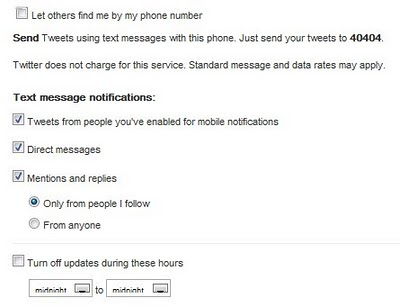
Text message notifications:
Twitter will send alerts to your phone, depending on your settings. You can limit it to particular times (I would not want to receive alerts in the middle of the night), or particular types of messages. You can limit to only those you allow to send to send alerts via twitter (perhaps, your family, dearest friends, or your boss, if you tweet for work); to direct messages, as well as mentions and replies.
So, you'll want to think about how many times you want twitter to alert your phone and for what. If you do not want twitter to alert you for any reason, make sure all of the notification messages are UNCHECKED.

Saturday, March 12, 2011
Google's Person Finder & other resources for Japanese Tsunami/Earthquake
I think the maps are especially useful but lots of good info available at the Google Crisis Response for the 2011 Japanese Earthquake/Tsunami. Google did a person finder for the Christchurch Earthquake, too, but this really encompasses much more information. Google has put together a list of resources for the 2011 Japanese Earthquake and tsunami, including a link to the person finder in English and Japanese).
Other resources include links to travel, maps(showing shelters, affected locations and more), latest news, and official information.
http://www.google.com/intl/en/crisisresponse/japanquake2011.html
(and it's a really interesting use of technology, social media, and harvesting data from a variety of sources... I will write more on the aspect later)
Other resources include links to travel, maps(showing shelters, affected locations and more), latest news, and official information.
http://www.google.com/intl/en/crisisresponse/japanquake2011.html
(and it's a really interesting use of technology, social media, and harvesting data from a variety of sources... I will write more on the aspect later)
Friday, March 11, 2011
Free webinars: Branding & identity, strategies for social media
Anyone can attend these! Have questions about branding, digital identity, influence, reputation management, drop me a line and I'll answer them as part of my presentation. ;-)
The Georgia Library Association is pleased to announce the March 2011 sessions of the newly retitled Carterette Series Webinars (formerly Wednesday Webinars). The series highlights trends, innovation, and best practices in Georgia Libraries. The webinars feature Georgia speakers, but registration is open to anyone, anywhere, so please forward this announcement to a friend. Topics are chosen to be of interest to employees of all library types, and each session is approved for one Georgia Continuing Education (CE) contact hour. Can't make it to the live show? That's okay--the sessions will be recorded and available on the CSW site for later viewing.
Strategy for Blogging and Social NetworkingPresented by Casey Long and Sarah Steiner
Wednesday, March 16, 2011, 10:00am - 11:00am EASTERN TIMESeparate registration is required for each hour-long session.
Blogs and social networking tools enable libraries to market resources, educate users, and build community relationships. To be effective, however, libraries must have a content strategy, schedule, and guidelines. In this session you will learn about the strategic planning techniques two libraries - dramatically different in size and staff - are using to maximize the impact of these tools while minimizing the workload of generating quality content.
Branding and Influence: Establishing Your Digital Identity and ReputationPresented by Robin Fay
Wednesday, March 16, 2011, 11:15am - 12:15pm EASTERN TIMESeparate registration is required for each hour-long session.
What is your library brand? Do you have one? What about your own brand? Do you "Google" yourself? How do you know if your social media presence is effective? Do you have digital credibility? We'll explore tools to cultivate a digital identity, branding, and ways to evaluate social media effectiveness.
~~~
The Carterette Series Planning Team
Buffy Hamilton: buffy.hamilton@gmail.com The Georgia Library Association is pleased to announce the March 2011 sessions of the newly retitled Carterette Series Webinars (formerly Wednesday Webinars). The series highlights trends, innovation, and best practices in Georgia Libraries. The webinars feature Georgia speakers, but registration is open to anyone, anywhere, so please forward this announcement to a friend. Topics are chosen to be of interest to employees of all library types, and each session is approved for one Georgia Continuing Education (CE) contact hour. Can't make it to the live show? That's okay--the sessions will be recorded and available on the CSW site for later viewing.
Strategy for Blogging and Social NetworkingPresented by Casey Long and Sarah Steiner
Wednesday, March 16, 2011, 10:00am - 11:00am EASTERN TIMESeparate registration is required for each hour-long session.
Blogs and social networking tools enable libraries to market resources, educate users, and build community relationships. To be effective, however, libraries must have a content strategy, schedule, and guidelines. In this session you will learn about the strategic planning techniques two libraries - dramatically different in size and staff - are using to maximize the impact of these tools while minimizing the workload of generating quality content.
Branding and Influence: Establishing Your Digital Identity and ReputationPresented by Robin Fay
Wednesday, March 16, 2011, 11:15am - 12:15pm EASTERN TIMESeparate registration is required for each hour-long session.
What is your library brand? Do you have one? What about your own brand? Do you "Google" yourself? How do you know if your social media presence is effective? Do you have digital credibility? We'll explore tools to cultivate a digital identity, branding, and ways to evaluate social media effectiveness.
~~~
The Carterette Series Planning Team
Tessa Minchew: Tessa.Minchew@gpc.edu
Sarah Steiner: ssteiner@gsu.edu
Wednesday, March 9, 2011
For Libraries: Host a "Making sense of the American Civil Wars"
The ALA Public Programs Office and the National Endowment for the Humanities (NEH) invite you to apply to host Let's Talk About It: Making Sense of the American Civil War, a reading and discussion program in America's libraries. Online applications are available at www.ala.org/civilwarprograms and must be submitted by April 19.
In June, 50 public, academic and community college libraries will be selected to host the reading and discussion series and receive support materials from NEH and ALA. The program grant includes:
- A $2,500 grant from NEH.
- Twenty-five sets of three titles: including March by Geraldine Brooks (Penguin, 2006), Crossroads of Freedom: Antietam by James McPherson (Oxford University Press, 2002) and a forthcoming Civil War anthology.
- Promotional materials to support local audience recruitment.
- Training for the library project director at a national workshop.
Just in time to commemorate the Civil War sesquicentennial, Let's Talk About It: Making Sense of the American Civil War follows the popular Let's Talk About It model, which engages participants in discussion of a set of common texts selected by a nationally known scholar for their relevance to a larger, overarching theme.
Funding for this program was provided by a grant from NEH to the ALA Public Programs Office. More information including project guidelines and the online application are available at www.ala.org/civilwarprograms. With questions, please contact the ALA Public Programs Office at publicprograms@ala.org or (800)545-2433 x5045.
Sincerely,
American Library Association
Public Programs Office
50 E. Huron - Chicago, IL 60611
www.ala.org/publicprograms
www.ProgrammingLibrarian.org
Tuesday, March 8, 2011
Question of the day: Tweet from your mobile phone (or change your number)
I know this info is available online, but it's my question of the day, so here goes. ;-)
Note> You can set it up twitter to use web or wifi if you have a smartphone; in that case, you may just want to use the appropriate Twitter app for your phone: Iphone; or Android (ton of choices).
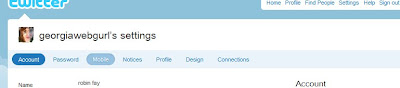
On your menu bar, choose> Settings

On the Settings page> Choose Mobile
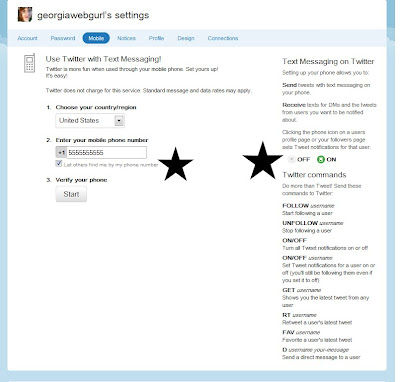
Use Twitter for text messaging!
1. Choose your country from dropdown.
2. Input your phone no. (change it here if you need to)
>Let others find me by my phone number: That is up to you, but think carefully about that.
Note the cheatsheet for Text Messaging on Twitter; you can always get back to this info via this screen, if needed.
3. Verify your phone> Click start (make sure your phone is on!) (Twitter will then connect with your phone; you must text twitter back in order to complete the process.)
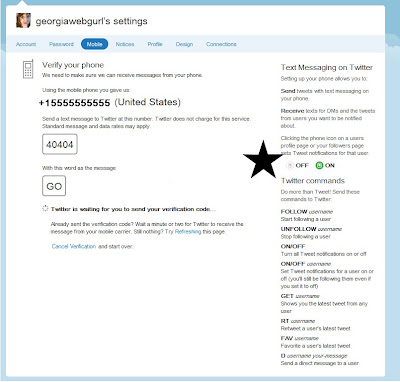
4. Verifying your phone - linking it to your twitter account
The shortcode for the U.S. is 40404; other codes can be found here
Once you receive a message from twitter, you will text back to your shortcode (in my case 40404) the message GO
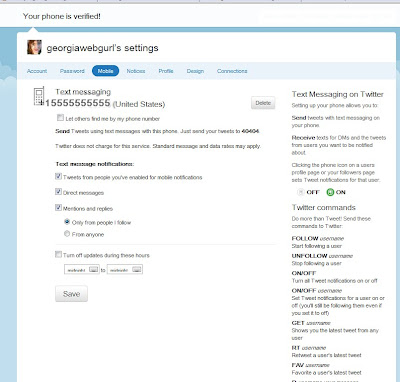 Once you do that it's done, but you do want to take a look at privacy, security, and CONVENIENCE settings.
Let others find me by my phone number: if you are trying to stay private, you may not want to turn this on.
Text message notifications:
Twitter will send alerts to your phone, depending on your settings. You can limit it to particular times (I would not want to receive alerts in the middle of the night), or particular types of messages. You can limit to only those you allow to send to send alerts via twitter (perhaps, your family, dearest friends, or your boss, if you tweet for work); to direct messages, as well as mentions and replies.
So, you'll want to think about how many times you want twitter to alert your phone and for what. If you do not want twitter to alert you for any reason, make sure all of the notification messages are UNCHECKED.
Note> You can set it up twitter to use web or wifi if you have a smartphone; in that case, you may just want to use the appropriate Twitter app for your phone: Iphone; or Android (ton of choices).
On your menu bar, choose> Settings
On the Settings page> Choose Mobile

Use Twitter for text messaging!
1. Choose your country from dropdown.
2. Input your phone no. (change it here if you need to)
>Let others find me by my phone number: That is up to you, but think carefully about that.
Note the cheatsheet for Text Messaging on Twitter; you can always get back to this info via this screen, if needed.
3. Verify your phone> Click start (make sure your phone is on!) (Twitter will then connect with your phone; you must text twitter back in order to complete the process.)

4. Verifying your phone - linking it to your twitter account
The shortcode for the U.S. is 40404; other codes can be found here
Once you receive a message from twitter, you will text back to your shortcode (in my case 40404) the message GO

 Once you do that it's done, but you do want to take a look at privacy, security, and CONVENIENCE settings.
Let others find me by my phone number: if you are trying to stay private, you may not want to turn this on.
Text message notifications:
Twitter will send alerts to your phone, depending on your settings. You can limit it to particular times (I would not want to receive alerts in the middle of the night), or particular types of messages. You can limit to only those you allow to send to send alerts via twitter (perhaps, your family, dearest friends, or your boss, if you tweet for work); to direct messages, as well as mentions and replies.
So, you'll want to think about how many times you want twitter to alert your phone and for what. If you do not want twitter to alert you for any reason, make sure all of the notification messages are UNCHECKED.
Monday, March 7, 2011
survey on digitization and ETDs
Hello Colleagues,
Has your U.S. university or college begun to plan or implement the retrospective digitization of older (non-ETD) theses or dissertations? If so, you are enthusiastically invited to assist in a research study on the WHY of retrospective digitization. A brief survey on the reasons, perceived benefits and unexpected challenges of retrospective digitization is now underway. It is expected that at least the preliminary results of this survey will be available to share at our national/international ETD conferences in the near future.
At present, the survey is directed at ETD professionals in the United States in order to facilitate correlation of data with institution types based on the Carnegie Classification system. Participants from higher education institutions in other countries are welcome to participate in the study, but their survey data may not be included in all analyses or reports.
If you are willing to participate in this 10-question survey, please click on the link below or paste it into your web browser. Your responses will be kept strictly confidential, and any reports from the research will not identify institutions or individuals.
http://www.surveymonkey.com/s/retrodig
Has your U.S. university or college begun to plan or implement the retrospective digitization of older (non-ETD) theses or dissertations? If so, you are enthusiastically invited to assist in a research study on the WHY of retrospective digitization. A brief survey on the reasons, perceived benefits and unexpected challenges of retrospective digitization is now underway. It is expected that at least the preliminary results of this survey will be available to share at our national/international ETD conferences in the near future.
At present, the survey is directed at ETD professionals in the United States in order to facilitate correlation of data with institution types based on the Carnegie Classification system. Participants from higher education institutions in other countries are welcome to participate in the study, but their survey data may not be included in all analyses or reports.
If you are willing to participate in this 10-question survey, please click on the link below or paste it into your web browser. Your responses will be kept strictly confidential, and any reports from the research will not identify institutions or individuals.
http://www.surveymonkey.com/s/retrodig
Saturday, March 5, 2011
Wikispaces free for higher ed
Wikispaces for Higher Education - FREE!
http://www.wikispaces.com/content/for/highered
We are giving away all of the features of our Plus wikis (normally $50/year).
No fine print, no usage limits, no advertising, no catches.
* Post, Publish, and Share with Ease
Unlimited pages let you and your students share text, images, files, and more.
* Set Privacy
You can decide who has access to your wiki’s content.
* Create Student Accounts
Our easy, three-step process doesn’t require email addresses.
* Embed Media
Video, audio, images, and more add impact to multimedia assignments.
* Customize Your Look
Our library of wiki themes and fully customizable colors and logos make your wiki a natural extension of your course.
http://www.wikispaces.com/content/for/highered
We are giving away all of the features of our Plus wikis (normally $50/year).
No fine print, no usage limits, no advertising, no catches.
* Post, Publish, and Share with Ease
Unlimited pages let you and your students share text, images, files, and more.
* Set Privacy
You can decide who has access to your wiki’s content.
* Create Student Accounts
Our easy, three-step process doesn’t require email addresses.
* Embed Media
Video, audio, images, and more add impact to multimedia assignments.
* Customize Your Look
Our library of wiki themes and fully customizable colors and logos make your wiki a natural extension of your course.
Friday, March 4, 2011
This is my brain on mindmap
So I was looking at a way to visualize my web presence, but even beyond that, some of my interests. Mainly this was for fun (yes, I do things like this for fun) but also to help me "see" where my interests are as I explore potential PhD programs.
Here is a start (which you can see at mindomo):

Here is a start (which you can see at mindomo):


Tuesday, March 1, 2011
Ebooks, e-lending, overdrive, & Harpercollins
Info about the controversial decision by HarperCollins to limit Overdrive e-books to 25 checkouts. Essentially this turns overdrive into a rental service.
--------------------------------
Library journal article
http://www.libraryjournal.com/lj/home/889500-264/harpercollins_overdrive_respond_as_26.html.csp
NYT post
http://mediadecoder.blogs.nytimes.com/2011/02/27/a-limit-on-lending-e-books/
HC's response to librarians here:
(shortened to:)
http://is.gd/CMcBdO
..and the ebook users bill of rights:
http://librarianbyday.net/2011/02/28/the-ebook-user%E2%80%99s-bill-of-rights-hcod-ebookrights/
--------------------------------
Library journal article
http://www.libraryjournal.com/lj/home/889500-264/harpercollins_overdrive_respond_as_26.html.csp
NYT post
http://mediadecoder.blogs.nytimes.com/2011/02/27/a-limit-on-lending-e-books/
HC's response to librarians here:
(shortened to:)
http://is.gd/CMcBdO
..and the ebook users bill of rights:
http://librarianbyday.net/2011/02/28/the-ebook-user%E2%80%99s-bill-of-rights-hcod-ebookrights/
Subscribe to:
Posts (Atom)